
How to Create a Claude Skill: I Built One and Tested It
Writing the skill takes ten minutes. Making Claude actually use it is the real work.
A Claude skill is a small file that teaches Claude to do one task your way, every time. Most guides show you how to write and upload one, then stop. They never check the part that decides whether the skill is worth anything: does Claude actually use it when you ask?
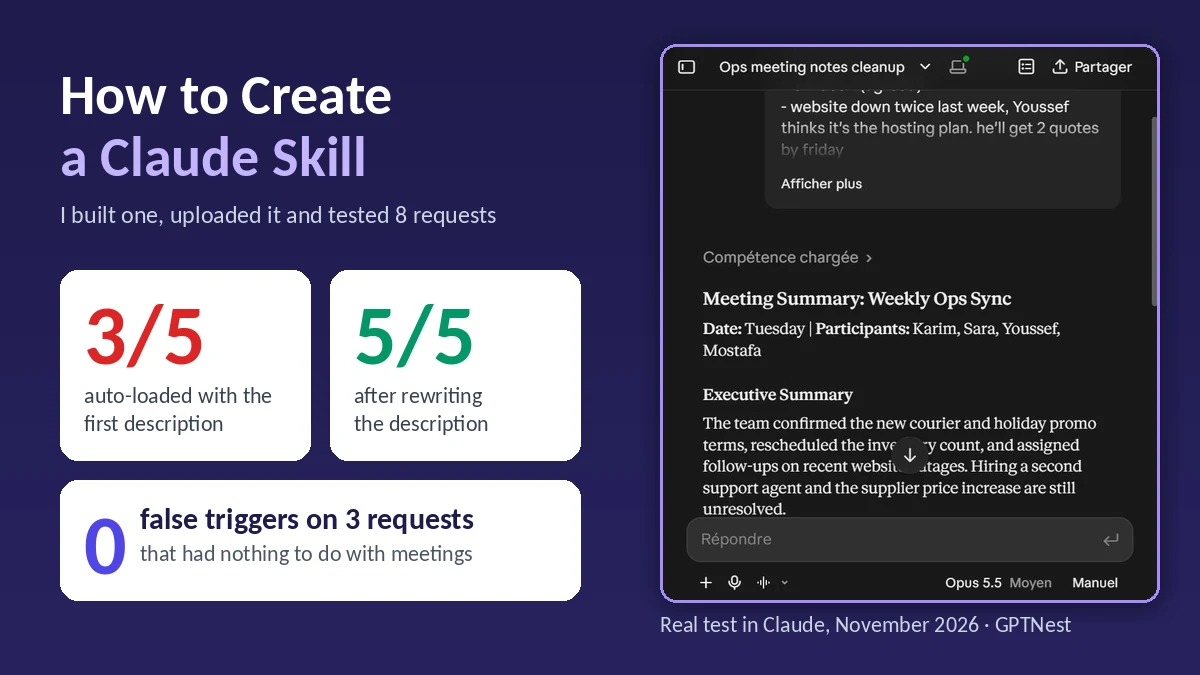
So I built a meeting-notes skill, uploaded it to my Claude account and sent it 8 test requests in new chats. With its first description, Claude picked it up on its own in only 3 of the 5 requests that needed it. After I rewrote the description, it picked it up in 5 of 5. Here is the whole process, the real SKILL.md, and the fix.
🔬 How I tested this
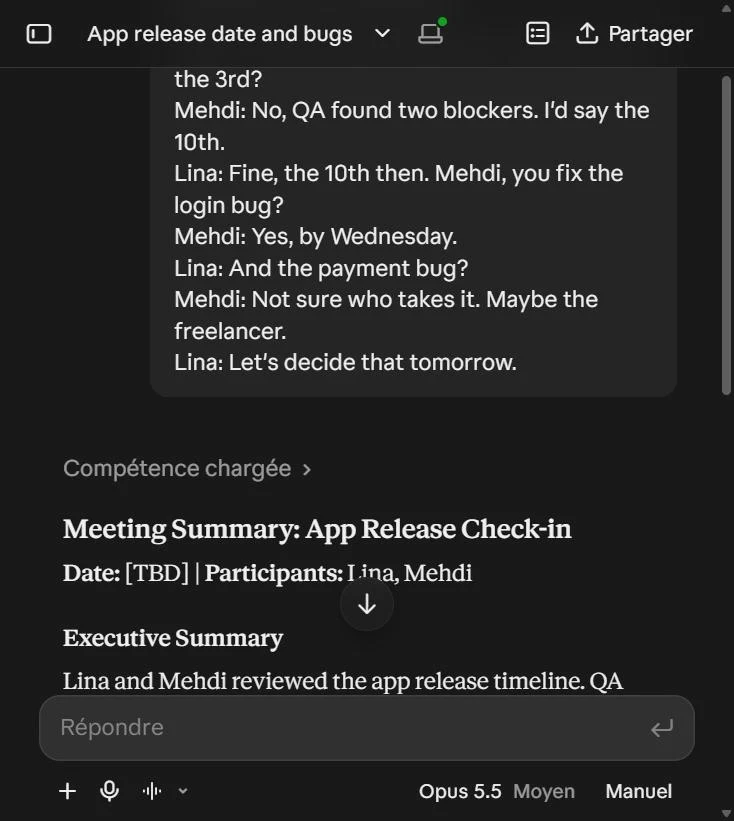
On November 8, 2026, I used my Claude Pro account with the default model shown in the chat box, Opus 5.5. I created the skill with the free GPTNest AI Skill Generator, uploaded it unchanged, and sent 8 requests, each in a new chat: 5 that should use the skill and 3 that shouldn’t. I then sent one request again with the skill turned off, rewrote the description, and re-ran the two requests that had failed. All the meeting notes are invented. My Claude interface is in French, so the screenshots show “Compétence chargée”, which means “Skill loaded”.
⚡ The short version
- Automatic use: with its first description, Claude loaded the skill on its own in 3 of 5 requests that needed it. After I rewrote the description, 5 of 5.
- False triggers: 0. Claude never used the skill for a LinkedIn post, a non-meeting summary or a tax question.
- Answer quality: with the skill, every summary used the same structure and stuck to the notes. Without it, the facts were still right, but the layout changed and Claude added a task that wasn’t in the notes.
- The fix: the description listed commands (“Turn this transcript into a summary”) but missed questions (“What did we decide, and who has to do what?”). Adding the ways people actually ask fixed both misses.
- A trap to avoid: typing
/skill-nameforces the skill, so it hides whether your description works.
What a Claude Skill Is
A saved procedure that Claude loads only when it needs it
A skill is a folder with one required file, SKILL.md. The file starts with a name and a description, followed by instructions, an output format and examples. You can add other files, such as a style guide or a script, and mention them in the instructions.
The clever part is how Claude loads it. At the start of a chat, Claude only sees the name and description of each skill you have turned on. When your request matches a description, it reads the full instructions. That keeps your chats light, but it also means the description decides everything: if it doesn’t match the way you ask, the skill stays unused.
| Prompt | Project instructions | Skill | |
|---|---|---|---|
| Where it works | The chat you paste it in | Every chat in one project | Any chat, when the request matches |
| Loaded | Every time you paste it | Always, in that project | Only when needed |
| Best for | One-off requests | Context about one project | A task you repeat everywhere |
The same format, called Agent Skills, also works in Claude Code and through the API, and ChatGPT Skills use it too. A skill you build for Claude is not locked to one app.
The Anatomy of a SKILL.md File
The real file I tested, shortened
---
name: summarizing-meeting-notes
description: "Converts unstructured, rough meeting notes into a professional,
  structured summary. Use this skill when you have messy scribbles, transcript
  snippets, or bullet points from a discussion... ideal for situations like:
  'Here are my notes from the sync, please clean them up', 'Turn this
  transcript into a summary'..."
---

# Meeting Note Summarizer

## Instructions
1. Analyze the notes for decisions, tasks and unresolved points.
2. Ask the user for the meeting title, date and participants if missing.
3. Identify all explicit decisions.
4. Extract action items with an owner and a deadline. If either is
   missing, mark it as [TBD].
5. List questions that were raised but not resolved.

## Output format
(a fixed template: Executive Summary, Key Decisions,
 Action Items with Owner and Deadline, Open Questions)

## Example
(one short input and the expected output)

## Guardrails
- Do not invent owners or deadlines; use [TBD].
- If the notes are too vague, ask instead of guessing.
The rules from Anthropic’s documentation that your file must respect:
- name: lowercase letters, numbers and hyphens only, 64 characters at most, and it can’t contain “claude” or “anthropic”. The folder in your zip must have the same name.
- description: up to 1,024 characters, no XML tags. Write it in the third person and say both what the skill does and when to use it.
- instructions: keep the file under about 500 lines. Claude is already capable, so only write what is specific to your task.
Step 1: Write the Skill
By hand, or generated and then checked
Pick a task you repeat at least weekly, with a clear input and a clear output. Meeting notes are a good first skill: the input is messy, the output should always look the same, and mistakes are easy to spot.
You can write SKILL.md in any text editor. I generated mine with the GPTNest AI Skill Generator, from this one-line task: “Turn rough meeting notes into a short summary with decisions, action items with owners and deadlines, and open questions.” The generator checks the name and description rules and builds the zip. I uploaded its output without editing it, so the test below is also an honest test of that tool.
📌 Tip
Put a trap in your test material. My notes said “Sara to update the returns page” with no date, and “Karim mentioned the supplier price increase, nobody owns it yet”. A good skill must leave Sara’s deadline empty and must not give the margin check to Karim.
Step 2: Upload the Skill to Claude
About two minutes
- Zip the folder, not just the file. The zip must contain
summarizing-meeting-notes/SKILL.md. - In Claude, open Settings › Capabilities and check that Create and edit files (code execution) is on. Skills need it.
- Go to Customize › Skills, click +, then Create skill › Upload a skill, and choose your zip. Claude shows a preview with the name and description and runs a security check.
- Make sure the skill is turned on in your list.
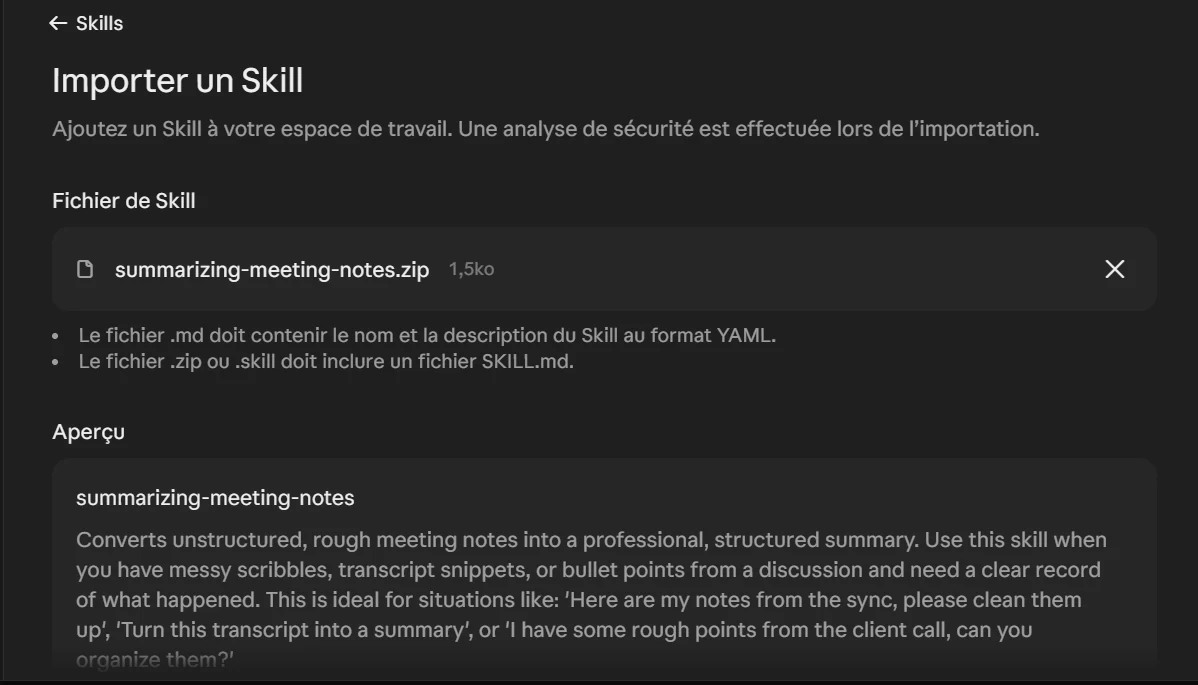
According to Anthropic’s help center, skills work on the Free, Pro, Max, Team and Enterprise plans. On Team and Enterprise, an owner may need to allow them first.
Step 3: Test Whether Claude Uses Your Skill
8 requests, each in a new chat, no shortcut
Uploading proves nothing. Write 5 requests that should use the skill, worded the different ways you really ask, and 3 that shouldn’t. Send each one in a new chat and look at Claude’s steps before the answer: it shows when a skill is loaded.
| Request | Should use it? | First description |
|---|---|---|
| “Here are my notes from today’s ops meeting, can you clean them up?” | Yes | ✅ Loaded |
| “Turn this into a summary with action items” | Yes | ✅ Loaded |
| “What did we decide, and who has to do what?” | Yes | ❌ Not loaded |
| French client notes: “tu peux les organiser ?” | Yes | ✅ Loaded (summary written in French) |
| “Summarize this transcript” + a short dialogue | Yes | ❌ Not loaded |
| Write a LinkedIn post about Sunday delivery | No | ✅ Not loaded |
| Summarize a paragraph about e-commerce | No | ✅ Not loaded |
| Explain VAT vs sales tax | No | ✅ Not loaded |
The two misses are revealing. The first is a question rather than a command. The second is odd at first sight, because the description itself gave “Turn this transcript into a summary” as an example. One example sentence was not enough for Claude to treat a plain “Summarize this transcript” as a match.
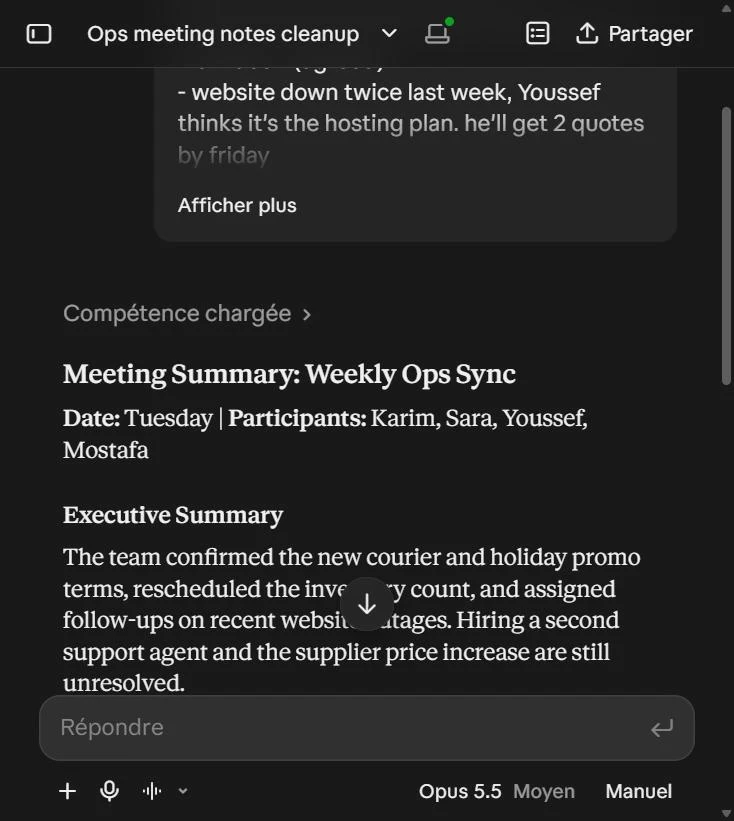
When the skill did load, the summaries were right every time: all three decisions (FastLink from December 1, a 15% promo, the stock count moved to December 14), Youssef’s quotes due Friday, Sara’s task with “[TBD]” as the deadline, and the margin check left without an owner. Both traps were avoided.
⚠️ Don’t test with the slash command
In my first run, the requests started with /summarizing-meeting-notes. That forces the skill, so every request “worked”. It’s a handy shortcut in daily use, but for testing it hides the real question: will Claude find the skill when you just ask normally?
Skill On vs Skill Off: What Actually Changes
Same request, same notes, new chat
To see what the skill adds, I turned it off and sent “Turn this into a summary with action items” with the same notes.
| What I checked | Skill on | Skill off |
|---|---|---|
| Decisions and owners | All correct | All correct |
| Layout | The same template in every answer | Its own layout: decisions, discussion, a table of actions |
| Invented content | None | Added “Prepare the FastLink transition, before Dec 1”, which isn’t in the notes |
| Missing details | Marked [TBD] | Shown as a dash |
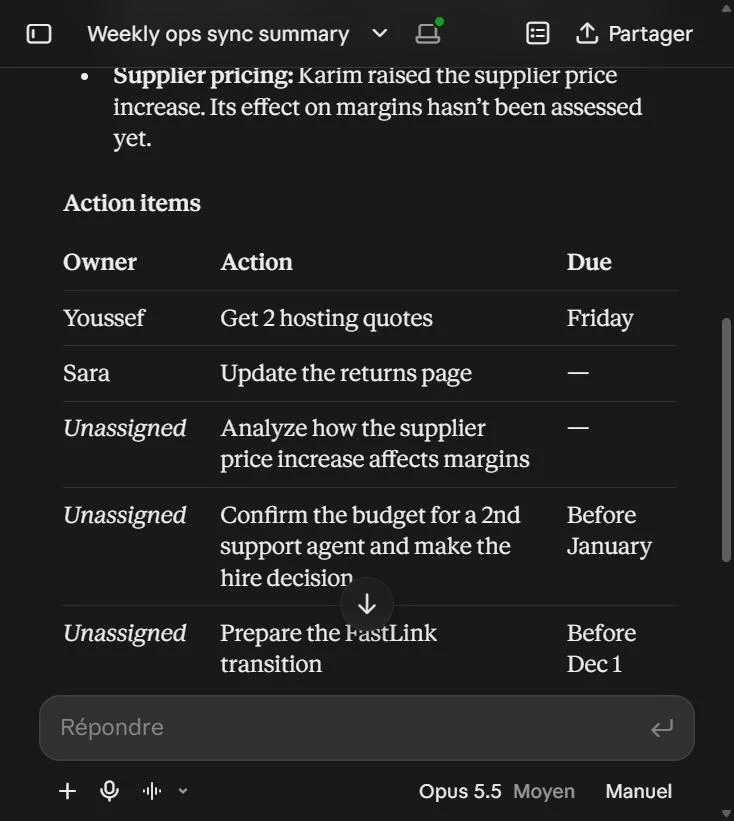
To be fair, Claude flagged that extra task as its own suggestion, and the facts were right without the skill. The value of a skill is not that Claude suddenly understands meetings. It’s consistency: the same structure, the same rules for missing information, and no extras, every time.
Step 4: Fix the Description
The change that took the skill from 3 of 5 to 5 of 5
I didn’t touch the instructions. I only rewrote the description to cover three things the first version missed:
- Every kind of input: notes, bullet points and transcripts from a meeting, call, sync or standup.
- Questions, not only commands: “what was decided, who has to do what, what the next steps are”.
- Real example requests: including “Summarize this transcript” and “What did we decide, and who does what?”.
description: "Converts rough meeting notes or meeting transcripts into a
  structured summary with key decisions, action items (owner and deadline)
  and open questions. Use this skill whenever the user pastes notes, bullet
  points or a transcript from a meeting, call, sync or standup and asks to
  summarize, recap, clean up or organize it, or asks what was decided, who
  has to do what, or what the next steps and action items are. Example
  requests: 'Here are my notes from the sync, please clean them up',
  'Summarize this transcript', 'What did we decide, and who does what?',
  'Turn this call into action items', 'Voici mes notes de reunion, tu peux
  les organiser ?'"
To update it, I used Replace in the skill’s menu and uploaded the new zip. Claude shows the version number, so you can check the change was applied. Then I re-ran the failed requests and one that shouldn’t trigger:
| Request | First description | Rewritten description |
|---|---|---|
| “What did we decide, and who has to do what?” | ❌ Not loaded | ✅ Loaded, correct summary |
| “Summarize this transcript” | ❌ Not loaded | ✅ Loaded, correct summary |
| Summarize a paragraph about e-commerce (not a meeting) | ✅ Not loaded | ✅ Still not loaded |
A limit to keep in mind: I re-ran only the two failed requests and one negative check, not the full set. Claude also changes over time, so repeat your test after model updates. Based on this test, the GPTNest skill generator now writes descriptions that include question-style requests by default.
Common Errors and Fixes
Most problems come from the zip or the description
| Problem | Likely cause | Fix |
|---|---|---|
| Upload refused | The folder name doesn’t match the skill name, or SKILL.md is missing | Zip a folder named exactly like name:, with SKILL.md inside |
| Upload refused | Invalid characters in the name or description | Lowercase, numbers and hyphens in the name; no XML tags anywhere |
| No upload option | Code execution is off, or an admin disabled custom skills | Turn on Create and edit files, or ask your workspace owner |
| Skill never loads | The skill is off, or the description doesn’t match how you ask | Turn it on, then add your real phrasings to the description |
| Skill loads for unrelated requests | The description is too broad | Say what the skill is not for, and test 3 negative requests |
Frequently Asked Questions
Short answers
Do I need to know how to code to create a Claude skill?
No. A skill can be a single text file with a name, a description and instructions in plain language. Scripts are optional.
Why doesn’t Claude use my skill?
Usually because your request doesn’t match the description. In my test, a question (“What did we decide?”) and “Summarize this transcript” were missed until I added those kinds of requests to the description. Also check that the skill is turned on.
How do I force Claude to use a skill?
Type a slash followed by the skill name, such as /summarizing-meeting-notes, at the start of your message. It works, but don’t use it when testing whether the description works.
Can I use the same skill in ChatGPT?
Often, yes. ChatGPT Skills use the same open Agent Skills format with a SKILL.md file. When they launched in July 2026 they were available on Business, Enterprise and Edu plans, so check your plan first.
Sources
Checked November 8, 2026
- Agent Skills overview, Claude Platform Docs.SKILL.md structure, name and description rules, how skills load.
- Skill authoring best practices, Claude Platform Docs.Third-person descriptions, what and when, the 500-line guideline.
- Use skills in Claude, Claude Help Center.Plans, upload steps and common upload failures.
- Skills guide, OpenAI.Same SKILL.md format on the OpenAI side.
- GPTNest Claude skill test, November 8, 2026.Claude Pro, Opus 5.5; 8 requests plus 1 with the skill off and 3 after the fix; invented meeting notes.
🧩 Build your own skill
Generate a Ready-to-Upload SKILL.md
Describe a task you repeat. The free generator checks the name and description rules and builds the zip for Claude.