
Free AI Skill Generator for Claude and ChatGPT
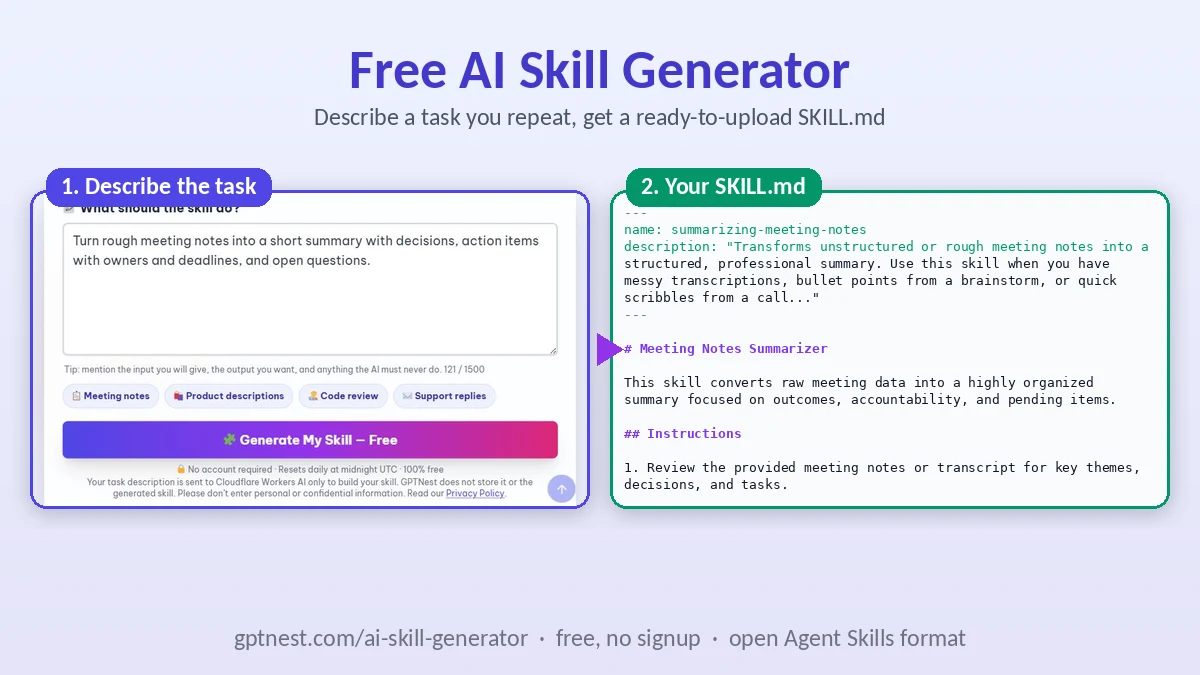
Describe a task you repeat. This free AI skill generator builds a ready-to-upload SKILL.md file in the open Agent Skills format.
Works seamlessly with Claude (claude.ai, Claude Code, API) and ChatGPT Skills.
Daily usage: 0 / 10 used (shared with the AI Prompt Generator)
Resets at midnight UTC
Tip: mention the input you will give, the output you want, and anything the AI must never do. 0 / 1500
🔒 No account required · Resets daily at midnight UTC · 100% free
Your task description is sent to Cloudflare Workers AI only to build your skill. GPTNest does not store it or the generated skill. Please don’t enter personal or confidential information. Read our Privacy Policy.
How to Install Your Skill
In Claude (claude.ai and the desktop app)
- Click Download .zip above. The zip contains one folder named after your skill, with the SKILL.md file inside. Claude needs the folder name to match the skill name.
- In Claude, check that Settings › Capabilities › Create and edit files (code execution) is on.
- Go to Customize › Skills, click +, then Create skill › Upload a skill, and choose the zip.
- Turn the skill on in your skills list. Start a new chat and ask for the task in your own words: Claude loads the skill when your request matches its description.
On Team and Enterprise plans, an owner may need to allow skills first. See Anthropic’s help article on using skills in Claude for plan details and troubleshooting, and the Agent Skills documentation for the full SKILL.md rules.
In Claude Code
Unzip the file into ~/.claude/skills/ for a personal skill, or into .claude/skills/ inside a project to share it with your team. The path should end with skills/your-skill-name/SKILL.md.
In ChatGPT
ChatGPT Skills use the same open Agent Skills format. Open Skills from the sidebar (under Plugins) and upload the skill file. When Skills launched in July 2026 they were available on Business, Enterprise and Edu plans, not on Free, Plus or Pro. If you don’t see Skills, your plan or your workspace admin has not enabled it.
No Skills on your plan? Copy the instructions part of the SKILL.md into a Project’s instructions or a custom GPT instead. It won’t load automatically, but the AI will follow it in that project. Developers can also use skills through the API: see OpenAI’s skills guide.
🧪 See it tested: I generated a skill with this tool, uploaded it to Claude and sent it 8 requests. Read How to Create a Claude Skill: I Built One and Tested It.
What Is an AI Skill (SKILL.md)?
A skill is a small folder that teaches an AI assistant how to do one task your way. Its main file, SKILL.md, starts with two fields: a name and a description. Below them come the instructions, the output format and an example.
The AI only reads the name and description at first. When your request matches the description, it loads the full instructions. That is why using an AI Skill Generator saves you from pasting the same long prompt again and again, and why the description is the most important part.
| Standard Prompt | Agent Skill | |
|---|---|---|
| How you use it | Paste it into every chat | Install once; the AI loads it when needed |
| Best for | One-off requests | Tasks you repeat every week |
| Can include files and scripts | No | Yes (our AI Skill Generator creates the SKILL.md; you can add files later) |
Need a one-off prompt instead? Use our free AI Prompt Generator.
How Our AI Skill Generator Works
- You describe the task (up to 1,500 characters). The page sends it securely to a small GPTNest server on Cloudflare Workers.
- Gemma 4, Google’s open model running on Cloudflare Workers AI, writes the skill: name, description, instructions, output format, an example and guardrails. It is told not to invent facts about your business and to use placeholders such as [company name] instead.
- The server then checks the rules from Anthropic’s skill documentation and fixes what it can: the name uses only lowercase letters, numbers and hyphens (64 characters at most) and never contains “claude” or “anthropic”; the description has no XML tags and stays under 1,024 characters.
- Your browser builds the zip file. You can edit the SKILL.md on the page before you download it.
What This Generator Does Not Do
The tool writes the SKILL.md file. It does not check how the skill behaves once it is installed, and that is where most skills fail.
- It does not test the skill for you. In my own test, a skill made with this tool was picked up automatically in only 3 of 5 requests that needed it. After I rewrote the description to include the way people actually ask, it was picked up in 5 of 5. See the full test.
- It creates instructions only. It does not add scripts, templates or extra files to the skill folder. If your task needs a script, add it yourself and reference it in SKILL.md.
- It does not know your business. The model is told to use placeholders such as [company name] instead of inventing details. Replace them before you upload the skill.
- A small model writes the draft. Gemma 4 is fast and free to run, but its instructions can be generic. Read the file and make the steps specific to your work.
- Check any skill before you install it. A skill can tell the AI to run commands or read files. Only install skills you have read, whether they come from this tool or from a public library.
A quick check that works: send three requests that should use the skill and two that should not, each in a new chat. If the skill is missed or used by mistake, change the description, not the instructions.
Frequently Asked Questions
Is this AI skill generator free?
Yes. There is no account and no payment. You can generate up to 10 skills or prompts per day in total, shared with the GPTNest AI Prompt Generator.
Does the same skill work in Claude and ChatGPT?
Yes, in most cases. Claude and ChatGPT Skills both use the open Agent Skills format: a folder with a SKILL.md file that starts with a name and a description. In Claude you upload the skill as a zip file. In ChatGPT, Skills depend on your plan and workspace settings.
Which Claude plans can use custom skills?
According to Anthropic’s help center, skills are available on Free, Pro, Max, Team and Enterprise plans, with code execution (Create and edit files) turned on. On Enterprise, an owner must allow skills first.
Why doesn’t Claude use my skill?
Claude chooses a skill by reading its description. Check that the skill is turned on, start a new chat, and ask for the task in words close to the description. If it still isn’t picked up, add the phrases you actually use to the description and upload the skill again.
Can I add scripts or reference files to my skill?
Yes. Put extra files, such as a style guide or a Python script, in the same folder as SKILL.md and mention them in the instructions. This tool creates the SKILL.md file; you can add files before you zip the folder again.
Is my task description saved?
GPTNest does not save your task description or the generated skill. Your text is sent to Cloudflare Workers AI only to generate the skill. Do not paste passwords, client data or other confidential information.