
Claude Skills vs Gemini Skills: I Tested the Same Skill on Both (2026)
One skill, one answer key, six identical requests. Here is what each assistant did with it.
Claude skills vs Gemini skills is suddenly a real choice. On November 17, 2026, Google started turning Gemini Gems into skills. OpenAI no longer lets personal accounts create custom GPTs and plans to retire them. If you built a reusable assistant in either tool, the ground just moved.
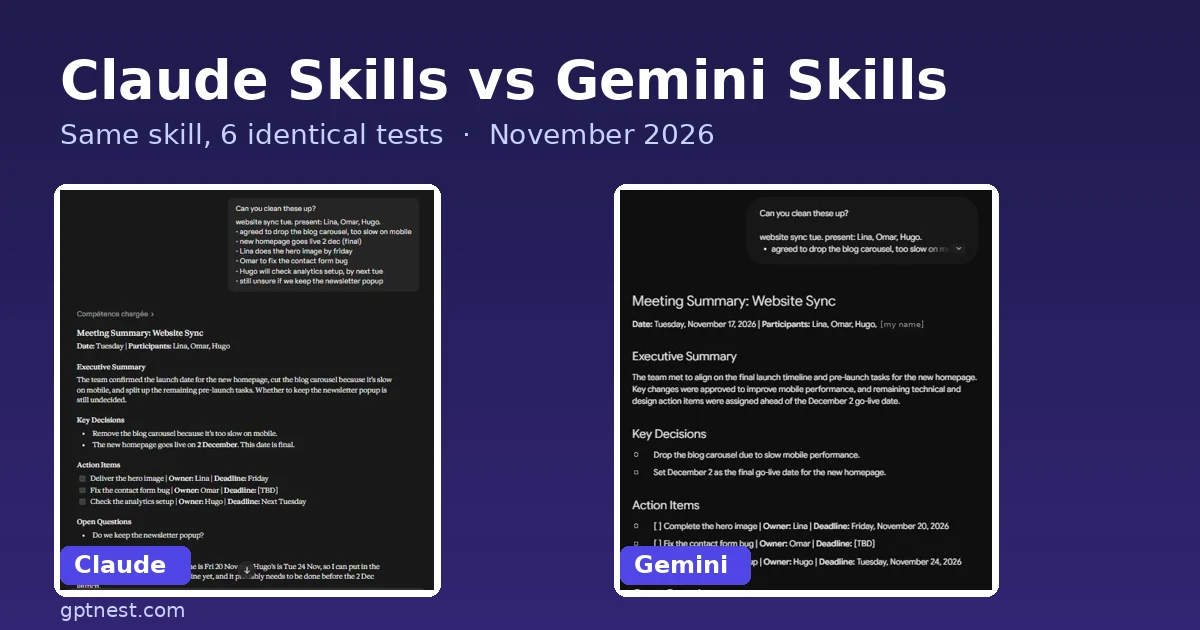
So I built the same meeting-notes skill in Claude and in Gemini, wrote the expected answers first, and sent both the same 6 requests in new chats. Both got the facts right. Only one showed me when the skill was running, and only one stuck to the notes without adding anything.
🔬 How I tested this
On November 17, 2026, I ran every request on my own accounts, each in a new chat. Claude: my Claude Pro plan with the default model, Opus 5.5. Gemini: the free plan with the model set to “Auto”. The skill and the 6 prompts were identical on both, and I wrote the answer key before the first run. All names and meetings are invented. My interfaces are in French, so the screenshots show French labels, and I hid my name in one of them. This is one run per case: a field test, not a benchmark.
⚡ The short version
- Skill applied: on the 4 sets of real notes, Claude applied the skill 4 times, Gemini 3 times. Gemini skipped it on a transcript.
- Visibility: Claude labels every answer that used a skill. In Gemini, the skill showed no sign either way.
- Accuracy: both got every decision and task right, and neither invented a task owner.
- Added details: Gemini turned “Friday” into an exact date and added my name as a participant. Claude didn’t.
- ChatGPT: not tested. Personal accounts can no longer create custom GPTs, and plugins are their replacement.
What Changed in November 2026
Gems, custom GPTs and skills, in one table
All three big assistants now push the same idea: reusable instructions that load on their own or that you call by name.
| Assistant | Old way | New way | Personal accounts |
|---|---|---|---|
| Gemini | Gems | Skills | Gems convert to skills automatically from November 17, 2026 |
| ChatGPT | Custom GPTs | Plugins | New GPT creation is not available on Free, Go, Plus or Pro |
| Claude | None | Skills | Available on Free, Pro and Max, with code execution turned on |
Work accounts get more time. Google moves Workspace business accounts in March 2027 and education accounts in June 2027. OpenAI says the GPT retirement affects all ChatGPT plans, with the dates shown in each account’s notice. If you used Gems, they now live on as Gemini skills.
Claude Skills vs Gemini Skills at a Glance
What I saw while building and using the same skill
On paper, Claude skills vs Gemini skills look closer than their names suggest. Both store a name, a description that says when to use the skill, and the instructions. The differences show up in how you create one and how much the assistant tells you.
| Claude skills | Gemini skills | |
|---|---|---|
| How you create one | Upload a zip with a SKILL.md file | Create with Gemini’s help, fill in a form, or import |
| Fields | Name, description, instructions (plus optional files) | Name, description, instructions (plus optional files) |
| Call it by hand | Type / and the skill name | Type @ (Gemini now says “/ is now @”) |
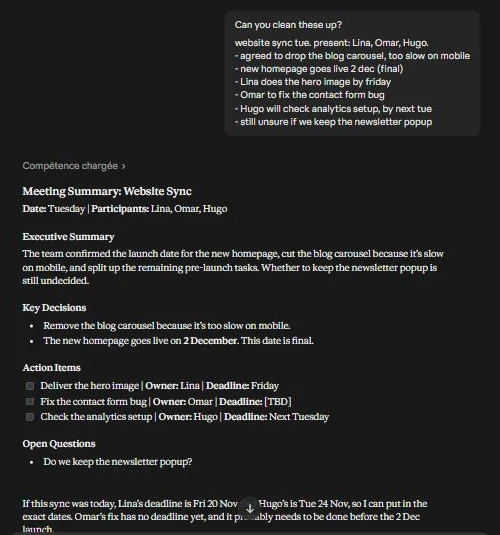
| Shows when a skill ran | Yes, a “skill loaded” label on the answer | No sign in my test |
| Free plan | Yes | Yes (I tested on the free plan) |
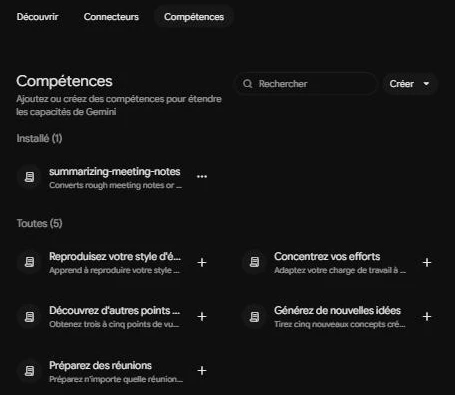
| Ready after saving | Already installed for this test | Took a few minutes to appear in my list |
Setting Up the Same Skill in Both
Same name, same description, same instructions
To compare Claude skills vs Gemini skills fairly, I used one skill: a meeting-notes summarizer. It turns rough notes into decisions, action items with an owner and a deadline, and open questions. Its most important rule: write [TBD] instead of guessing a missing owner or date.
Claude. A Claude skill is a folder with a SKILL.md file, uploaded as a zip in the capabilities settings. I had already built and tested this exact skill for my step-by-step Claude skill guide, so it was ready to go.
Gemini. Open the Gemini menu, then More, Customize, and the Skills tab. Click Create and choose to create with Gemini, create manually or import. I created it manually and pasted the same name, description and instructions.
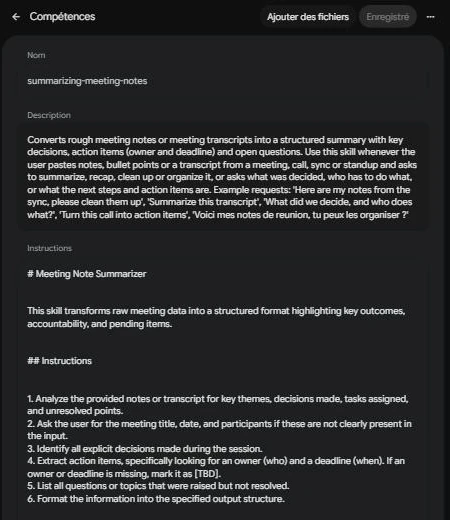
One practical difference: after I saved, the Gemini skill took a few minutes to show up under “Installed”. My first save looked like it did nothing. I didn’t test Gemini’s import button with a SKILL.md file, so I can’t say yet whether one file works in both.
Claude Skills vs Gemini Skills: Results of the 6 Tests
Same prompts, new chat each time, scored against the answer key
Here is how Claude skills vs Gemini skills compared, case by case. On the 4 sets of real notes, Claude applied the skill 4 times and Gemini 3 times. Gemini skipped it on the transcript.
| Case | What it tests | Claude | Gemini |
|---|---|---|---|
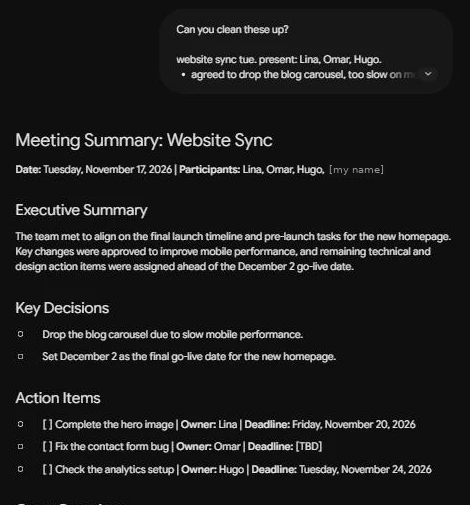
| 1. Simple notes | Basic extraction | ✅ 2/2 decisions, 3/3 actions, [TBD] where needed | ⚠️ Facts right, but added my name and turned “Friday” into exact dates |
| 2. French notes | Another language | ✅ Answered fully in French | ✅ French content, English headings |
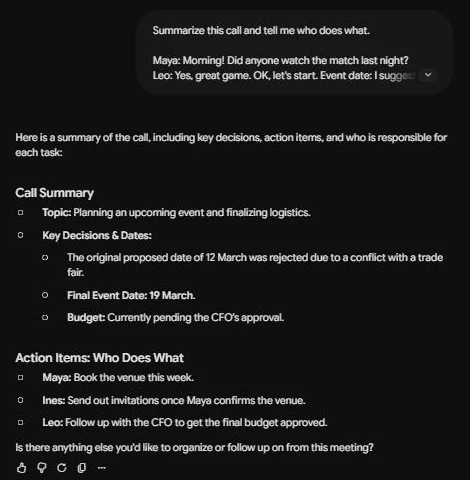
| 3. Reversed decision | Keeps the final answer | ✅ 19 March, small talk removed | ⚠️ Facts right (19 March), skill not applied |
| 4. No owners | No invention | ✅ Every owner [TBD] | ✅ Every owner [TBD] |
| 5. Too vague | Asks instead of guessing | ✅ Asked for details (skill not loaded) | ✅ Asked for details |
| 6. Should not trigger | No false trigger | ✅ Wrote the email | ✅ Drafted the email in Gmail, unsent |
Both tools added one extra action item in case 4: “move the weekly report” was a decision, not a task. Small, but worth knowing if the output feeds a task tracker.
What Stood Out
Six things the scores alone don’t show
1. You can see when Claude uses a skill. You can’t with Gemini.
Claude showed a “skill loaded” label above each answer and listed the skill used in the chat. Gemini skills gave no signal, so I could only tell from the format of the answer. When a skill silently doesn’t run, as in case 3, you won’t know unless you check.
2. Gemini filled gaps with guesses.
The notes said “Friday” and “next Tuesday”. Gemini wrote exact calendar dates and assumed the meeting happened that day. It also added my first name to the participants, taken from my Google account. Claude kept “Friday” and offered exact dates as a follow-up question instead.
3. Gemini dropped the skill on a transcript.
Case 3 was a dialogue, not bullet notes. Gemini answered correctly but in its own format, without owners or deadlines laid out. If your notes come from a transcription tool, test that case first.
4. Neither invented an owner.
With no names in the notes, both wrote [TBD] for every task. That was the guardrail I cared about most, and both passed.
5. Neither over-triggered.
Asked for an email invitation, both wrote an email. A skill that hijacks unrelated requests is worse than no skill, so this is a real pass.
6. Vague notes got questions, not fiction.
Given one vague line, both asked for details. Claude did it without loading the skill, but it still used “?” placeholders instead of names or dates.
Where ChatGPT Fits
Custom GPTs are on their way out
ChatGPT is not in this test. OpenAI’s help center says new GPT creation is not available on personal accounts, including Plus and Pro. Its replacement is plugins, which bring reusable instructions, reference files and connected apps together.
OpenAI also says migration and plugin access can differ by account, and that personal accounts should follow an in-product notice. I haven’t tested ChatGPT plugins, so this Claude skills vs Gemini skills comparison leaves ChatGPT out.
If you rely on a custom GPT today, copy its instructions somewhere safe now. They are plain text, and the same text works as a Claude or Gemini skill.
Which One Should You Build On?
Start where you already work, then test
In the Claude skills vs Gemini skills choice, the best tool is usually the one you already open every day. Then test your skill on your own messy inputs before you trust it.
- Pick Claude if you need to see when the skill runs, or if its output feeds another step, such as a task tracker. In my test it was the more predictable of the two.
- Pick Gemini if you live in Gmail and Google Docs, or want Google’s free plan. Check the output for added details, and test transcripts separately.
- Keep your instructions portable. Claude skills and Gemini skills both take plain text. Write your skill once in a plain text file and paste it where you need it. The free AI Skill Generator builds that file for you.
Whatever you pick, add one rule to every skill: write [TBD] instead of guessing. It was the line that kept both tools honest in case 4.
Run the Same Test on Your Own Skill
Six prompts find most weak spots
These are the six prompts I used for Claude skills vs Gemini skills, and they work for any skill. Use a new chat for each prompt, and don’t name the skill: you’re testing whether it loads on its own.
- A clean case. Short notes with clear owners and dates. Checks the basic format.
- Another language. The same kind of notes in French or Spanish. Checks that the skill still triggers.
- A transcript. A dialogue where a decision changes halfway. Checks that it keeps the final answer and drops small talk.
- Missing information. Tasks with no owner. The right answer is [TBD], never a made-up name.
- Too little to work with. One vague line. The right answer is a question back to you.
- An unrelated request. Something close but different, like an email invitation. The skill should stay out of it.
The transcript I used for case 3:
Summarize this call and tell me who does what.

Maya: Morning! Did anyone watch the match last night?
Leo: Yes, great game. OK, let's start. Event date: I suggest 12 March.
Maya: Works for me, let's say 12 March.
Ines: Wait, 12 March clashes with the trade fair. Can we do 19 March?
Leo: Good point. OK, 19 March then, final.
Maya: I'll book the venue this week.
Ines: I'll send the invitations once the venue is confirmed.
Leo: Budget is still open, I need the CFO's answer.
Write the expected answer before you run anything. Otherwise it’s too easy to call a wrong answer “close enough”. For more on writing instructions an assistant actually follows, see my context engineering guide.
Frequently Asked Questions
Short answers
What happens to my Gemini Gems?
On personal Google accounts, Google started converting Gems into skills automatically on November 17, 2026. Workspace business accounts follow in March 2027 and education accounts in June 2027.
Can I still create a custom GPT?
Not on a personal account. OpenAI says new GPT creation is not available on Free, Go, Plus or Pro, and it plans to retire custom GPTs in favor of plugins.
Are Claude skills free?
Yes. Anthropic lists skills on the Free, Pro and Max plans, as well as Team and Enterprise. Code execution must be turned on.
Can I use the same skill in Claude and Gemini?
The text, yes. Claude skills and Gemini skills both use a name, a description and instructions, and I pasted the same text into both. I haven’t tested whether Gemini’s import accepts a Claude SKILL.md file.
Claude skills vs Gemini skills: which is better for meeting notes?
In my 6 tests, Claude was more consistent and showed when the skill ran. Gemini got the facts right but skipped the skill on a transcript and added details that weren’t in the notes.
Sources
Checked November 17, 2026
- Let skills in Gemini tackle your most repetitive tasks, Google, September 30, 2026.Skills replace Gems; removal dates by account type.
- Google Is Replacing Gemini Gems With Skills Nov 17, TechRepublic.Automatic conversion of personal Gems from November 17.
- GPTs in ChatGPT, OpenAI Help Center.No new GPT creation on personal accounts.
- Custom GPT retirement and migration FAQ, OpenAI Help Center.Plugins as the replacement; all plans affected.
- What are skills?, Anthropic Help Center.Plans that include skills; code execution requirement.
- GPTNest skills test, November 17, 2026.Claude Pro (Opus 5.5) and Gemini free plan (Auto); 6 requests each in new chats; invented meeting notes.
🧩 Build your own skill
Generate a Skill You Can Use in Claude or Gemini
Describe a task you repeat. The free generator writes the name, description and instructions, ready to upload or paste.