
🧠 AI Mindset 🎯 Prompting 🔥 Trending 🆕 2026 Guide ✅ Updated April 2026

How to Think Like AI to Get Better Results — The 2026 Mindset Guide Practical mental models for getting smarter, faster, more useful output — every single time

Person using AI tools with a mindset-focused workflow — how to think like AI mindset guide 2026

Most people use AI the same way they use a search engine — they type a question, read the answer, and move on. That’s fine for quick lookups. But if you want AI to write a proposal that wins a client, explain a concept your team will actually act on, or help you think through a hard decision, you need a different approach entirely. You need to learn how to think like AI to get better results.

This isn’t about memorizing prompt formulas. It’s about understanding what AI is actually doing when it responds — how it interprets instructions, what signals it follows, and why it sometimes gives you something generic when you wanted something sharp. Once you see that, everything changes.

What follows are practical mental models — ways of thinking that consistently produce better output, regardless of which AI tool you’re using. No jargon. No magic tricks. Just principles that work.

✍️ By GPTNest Editorial · 📅 April 18, 2026 · ⏱️ 13 min read · ★★★★★ 4.9/5

Before You Read — 5 Things That Will Shift Your Thinking and make you Think Like AI to Get Better Results

AI doesn’t think — it predicts. Understanding this one fact changes how you write prompts. AI assembles the most likely continuation of your input. Your job is to give it an input that points toward a great continuation.
Context is everything. AI has no memory of who you are, what you know, or what you’ve tried before. Every prompt starts from zero. Front-loading context is the single highest-leverage habit you can build.
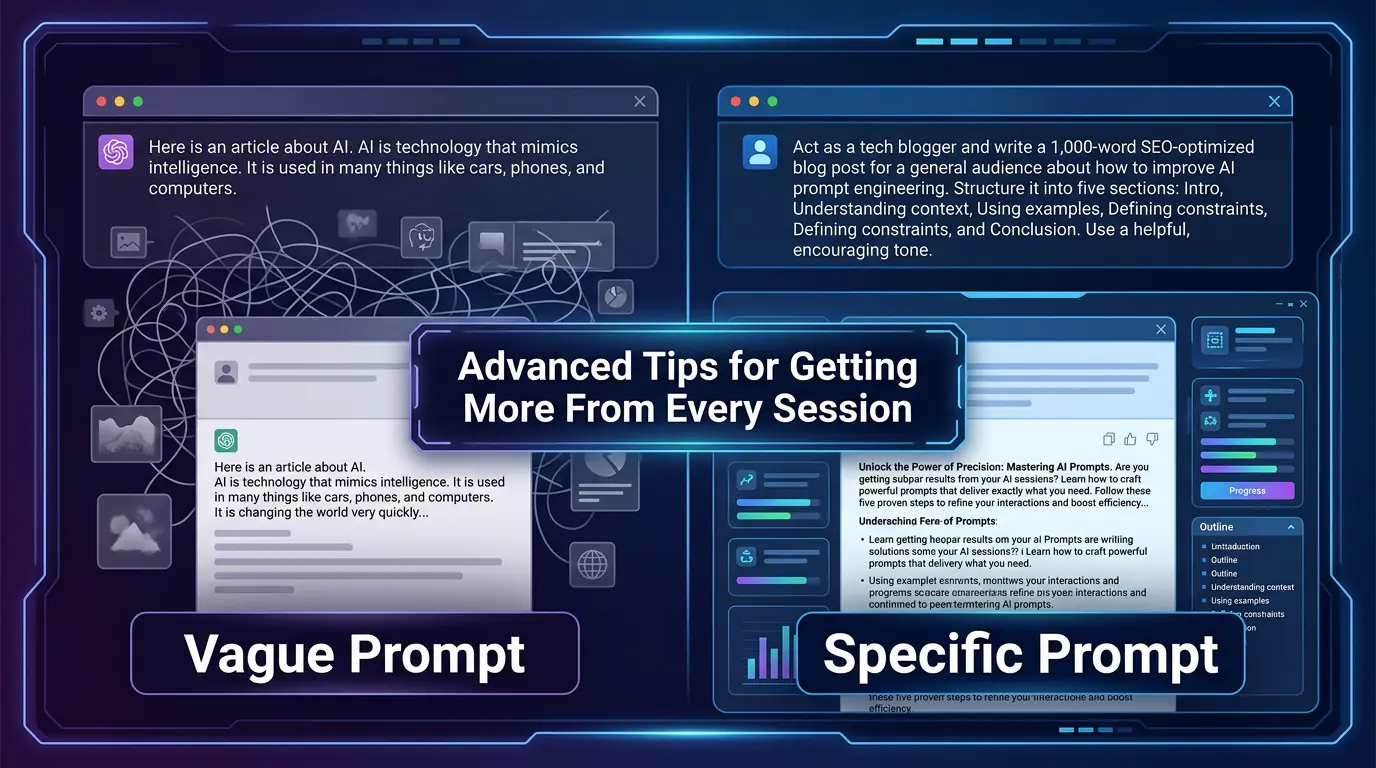
Vague prompts produce average output. AI optimizes for what’s most statistically common given your input. A vague prompt invites a generic response. A specific prompt narrows the possibility space dramatically.
You’re the editor, not the passenger. The best use of AI is as a fast first draft. Your judgment and expertise are what make it good. Never skip the editing step.
Better questions come from better thinking. The clearer your thinking before you open an AI tool, the better your result will be after. This guide is really about sharpening both.

7

Core Mental Models

5

Practical Thinking Shifts

10×

Better Output, Same Tool

13m

Average Read Time

What You’ll Learn in This Guide – ” Think Like AI to Get Better Results ”

The Core Mental Model: AI as a Mirror

Understanding what AI actually does — and why that changes everything

🧠 Start Here

The most useful way to think about AI is as a very fast, very well-read mirror. It reflects back the quality of your thinking. A muddled prompt produces a muddled response. A clear, specific, well-structured prompt produces clear, specific, well-structured output. This isn’t metaphorical — it’s mechanically true.

When you ask “what should I write about?” you’re giving the AI almost no signal. When you ask “I run a freelance UX consulting practice targeting early-stage SaaS startups — what are three blog post angles that would attract founders who are about to hire their first designer?”, you’ve given it a rich signal. The output will reflect that difference immediately.

Mental Model — Mirror Logic

Before writing a prompt, ask yourself: “If someone handed me exactly this input with zero additional context, what would I produce?” If the honest answer is “something generic,” you need more context in your prompt.

Practical Application

Write your prompt in a notepad first. Read it back as if you’re someone who knows nothing about your situation. Fill the gaps you notice. Then paste it. This adds 90 seconds and often doubles output quality.

💡 Key Insight

The quality ceiling of your AI output is set by the quality of your input. There’s no technique that reliably compensates for a vague or under-specified prompt. Invest in the setup, not just the ask.
The Context Principle — Why Setup Beats Cleverness

The single most important habit for better AI results

People spend a lot of energy searching for “the perfect prompt formula.” In practice, the single highest-impact habit is much simpler: give AI the context it needs to behave like a knowledgeable collaborator rather than a stranger on the street.

Context means: who you are, what you’re working on, who the audience is, what format you need, what tone fits, and what already exists. AI has none of this unless you tell it. Every conversation starts fresh. The people who get consistently good results have internalized this — they front-load their context without thinking about it.

Context Framework — The Five Inputs

Who you are: Your role, expertise level, or industry. What this is for: The deliverable and its purpose. Who reads it: The audience and what they care about. Constraints: Length, tone, format, what to avoid. What you already have: Existing drafts, key facts, or decisions already made.

Before vs. After Example

Before: “Write an about page for my website.” After: “Write an About page for my independent brand strategy consultancy. I work with fashion and lifestyle brands. Tone: warm but professional, first-person. 200 words. Avoid buzzwords like ‘passionate’ or ‘results-driven.’ Include what I do, who I work with, and one line about my approach.”

📖 Real Case — Marketing Consultant, Rabat, 2026

A marketing consultant spent weeks frustrated with AI-generated email copy that felt flat and generic. She wasn’t changing her prompts — she was just retrying the same vague instruction. A colleague showed her the context principle. She spent five minutes writing a “context block” — a 150-word paragraph describing her voice, her clients, her typical email structure, and what she wanted to avoid. She pasted it at the start of every session. Within two days, she stopped editing drafts heavily and started using them directly with minor tweaks. The tool didn’t change. Her input did.

Narrowing the Possibility Space

Why constraints improve output — not limit it

🎯 High Impact

Counterintuitively, adding more constraints to a prompt almost always produces better output. When you say “write something creative,” you’ve opened an infinite possibility space — and AI will land somewhere statistically safe in the middle of it. When you say “write a 3-sentence hook for a cold email, no fluff, no rhetorical questions, leading with a specific business problem,” you’ve narrowed the space dramatically. The output has nowhere to go except toward your target.

Think of it like giving directions. “Go somewhere nice for dinner” gives a cab driver no useful information. “Italian, within 10 minutes, under $40 for two, quiet enough to talk” gets you somewhere worth going. Constraints are directions, not restrictions.

Types of Constraints That Work

Format: word count, paragraph structure, number of items. Tone: specific adjectives (e.g. “direct, not formal”), what to avoid. Audience: who reads this, what they already know. Exclusions: what not to include — often more useful than what to include.

The “What to Avoid” Technique

Adding a line like “avoid clichés, avoid filler phrases like ‘in today’s fast-paced world,’ avoid bullet points” consistently tightens output. Telling AI what not to do is often more efficient than trying to describe exactly what you want — because bad patterns are easier to name than good ones.

✅ Quick Habit

Before submitting any prompt, add one line at the end: “Avoid [the most common bad version of this output].” For blog posts, that might be “avoid generic advice and vague tips.” For emails, “avoid corporate language and passive voice.” This one addition saves significant editing time.

Role Thinking — Assign a Perspective, Not Just a Task

One of the most underused techniques in everyday AI use

Asking AI to “act as” a specific type of expert or adopting a perspective changes the register and depth of the response in useful ways. This isn’t a gimmick — it’s a way of loading a particular set of assumptions, vocabulary, and priorities into the output.

The difference between “explain compound interest” and “explain compound interest as a high school economics teacher would to a class of 16-year-olds with no finance background, using one real-life example” is dramatic. The role and audience together shift everything: vocabulary level, examples chosen, analogies used, what gets emphasized.

Role Assignment — Practical Formats

“You are a [type of expert] with [specific experience or focus]. Your audience is [who]. Write [deliverable] that [outcome you want].”

When Role Thinking Matters Most

Use role assignment when you need domain-specific reasoning (legal review, financial framing, technical explanation), a specific register of communication (investor pitch vs. internal memo), or a particular kind of feedback (editor, skeptical customer, first-time reader).

📖 Real Case — Startup Founder, Casablanca, 2026

A founder needed to explain her SaaS product’s pricing structure to two very different audiences in the same week — her technical co-founder and a non-technical investor. Same information, completely different presentations needed. She used role thinking: first, “explain this pricing model to a skeptical CTO looking for edge cases and technical complexity,” then “explain this pricing model to a Series A investor who thinks in unit economics and market comparables.” Two prompts, two perfect outputs. The role did the translation work so she didn’t have to.

Iteration Over Perfection — The Conversation Loop

Why the second prompt matters as much as the first

One of the most common beginner habits is reading the first AI response, deciding it’s not quite right, and going back to write a completely new prompt from scratch. This is inefficient. AI conversations are genuinely iterative — the best output usually comes from refinement, not replacement.

When a response isn’t what you wanted, diagnose specifically what’s wrong before rewriting. Is it too long? Too vague? Wrong tone? Wrong structure? Each of these has a targeted fix. “Make this more specific, especially the second paragraph” produces better results than starting over with a vague new prompt.

Iteration Prompts That Work

“This is good but too formal — rewrite in a more conversational tone.” / “The structure is right but the examples are too generic — replace them with examples from [your specific industry].” / “Shorten this by 40% without losing the three main points.”

The Three-Round Rule

For complex deliverables, plan for three rounds: (1) broad draft, (2) targeted refinement on weak sections, (3) final polish for tone and flow. Expecting a perfect first draft every time leads to frustration. Expecting a good third draft is realistic and repeatable.

Reading Output Signals — What Bad Results Are Telling You

Diagnose the problem before you rewrite the prompt

Every type of weak AI output is a diagnostic signal. Once you learn to read them, you can fix the underlying prompt issue rather than just trying again and hoping for a different result. Here’s what common problems usually indicate.

Too Generic → Missing Specificity

Output that reads like it could apply to anyone usually means your prompt lacked a specific audience, use case, or constraint. Add more of those. “For a [specific type of person] dealing with [specific problem]” often resolves this immediately.

Wrong Tone → Missing Tone Signal

If the output is too formal, too casual, or feels robotic, your prompt didn’t specify tone. Add tone descriptors — and, crucially, add examples of what to avoid. “Warm but professional, not corporate” is more useful than “professional.”

Too Long or Rambling → Missing Format Constraints

Without explicit length and structure guidance, AI tends toward completeness over concision. Add specific format instructions: “3 paragraphs,” “under 150 words,” “no more than 5 bullet points.” Structure constraints fix most length problems.

Superficial Thinking → Missing Depth Signal

Shallow analysis usually means your prompt didn’t ask for depth. Try: “Think through this carefully before responding,” “Give me the non-obvious insight here, not the surface-level take,” or “What would a domain expert notice that a generalist would miss?”

Building a Workflow That Consistently Works

From one-off experiments to a repeatable system

The people who get the most out of AI aren’t experimenting from scratch every day. They’ve built small, repeatable workflows — a set of prompts they’ve refined over time that reliably produce good output for their most common tasks. Building yours doesn’t require a major project. It starts with one use case.

Step 1 — Identify Your Highest-Frequency Task

What do you use AI for most often? Email drafts, content outlines, client summaries, research synthesis? Pick one. This is the task you’ll refine first.

Step 2 — Build Your Context Block

Write a 100–200 word paragraph that gives AI everything it needs to know about your situation for this task. Your role, your audience, your style preferences, what to avoid. Save this somewhere accessible.

Step 3 — Run It, Refine It, Save the Winner

Use the context block + your task prompt together three or four times. Each time, note what’s missing. Add it. After four rounds, you’ll have a prompt that’s reliably good — not occasionally good.

Step 4 — Expand Slowly

Once one workflow is solid, add another. Five well-tuned workflows beat fifty mediocre ones. Quality compounds. The prompt library you build over three months will save you more time than any individual AI feature.

⚡ Common Mistakes and What to Do Instead

The most frequent AI prompting mistakes — and the direct fix for each one.

MistakeWhat Goes WrongThe Fix
Vague promptGeneric, could-be-anyone outputAdd audience, use case, and constraints
No tone guidanceOutput sounds robotic or off-brandSpecify tone with adjectives + what to avoid
Starting over each sessionNo compounding improvementSave and reuse a context block
Accepting first draftMissing refinement that editing addsBudget time for 1–2 iteration rounds
No format instructionsOutput too long or badly structuredSpecify length, structure, number of items
Skipping the “what to avoid” linePredictable clichés appear anywayExplicitly name the bad patterns
One giant promptAI loses focus midway throughBreak complex tasks into sequential prompts

🏆 Pro Tips for Thinking Like AI Every Day

The Daily Mindset Checklist

Before prompting: Can I state clearly what I want, who it’s for, and what format it needs? If not, spend 60 seconds clarifying first.
After reading output: Is this weak because my prompt was weak — or because AI genuinely can’t do this task well? Different problems, different solutions.
Before delivering anything: Read the output as if you were the client or reader. Edit what doesn’t sound like you. Add what only you would know.

Habits Worth Building This Week

Write your prompts in a notepad before pasting — read them back as a stranger first
Save one context block for your most common AI task
Add “avoid [specific bad pattern]” to every prompt this week and track the difference
After each good result, save the prompt that produced it

✅ The One Shift Worth Making Today

Before your next AI session, spend three minutes writing a context block: who you are, what you’re working on, your preferred tone, and what you want to avoid. Paste it at the start of the conversation. Use it for the whole session. Compare the output to what you normally get. This single change delivers more improvement than any prompt formula you’ll find online.

Thinking like AI isn’t about becoming robotic or mechanical. It’s about developing clarity — about what you actually want, who it’s for, and what form it should take. That clarity was valuable before AI existed. It just pays off faster now.

The people getting great results from AI in 2026 aren’t using exotic tools or secret techniques. They’ve internalized a small set of mental models — context, constraints, iteration, diagnosis — and they apply them automatically. That’s what this guide was designed to give you. Start with one principle. Build from there.

⚡ Advanced Tips for Getting More From Every Session

Side-by-side comparison of vague versus specific AI prompts showing improved output quality

💡 Use Sequential Prompts for Complex Work

For any task longer than a few paragraphs, break it into stages. First prompt: outline or structure. Second prompt: expand one section at a time. Third prompt: tone and polish. Sequential prompts consistently outperform one giant prompt — AI keeps focus, and you can course-correct between each stage.

✅ Ask AI to Critique Its Own Output

After getting a draft, try: “Read this back and tell me the three weakest parts, and why.” This often surfaces problems you’d catch later — and gives you a refined version faster than reading it yourself three times. AI is genuinely useful as a self-critic when prompted correctly.

⚠️ Don’t Outsource Your Thinking — Augment It

The biggest long-term risk isn’t bad output — it’s atrophied thinking. Use AI for production, not for deciding what you actually think. Bring your conclusions, your expertise, your point of view into the prompt. AI makes those sharper. It’s not a substitute for having them.

More AI Thinking & Prompting Resources

Scroll to Top