⚙️ Workflow Automation 🤖 Enterprise AI 🔥 B2B Trending 🆕 2026 Guide ✅ Updated April 2026

10 Best Enterprise AI Tools for Workflow Automation in 2026 Agentic pipelines, API integrations, and proven B2B architectures for real operational ROI

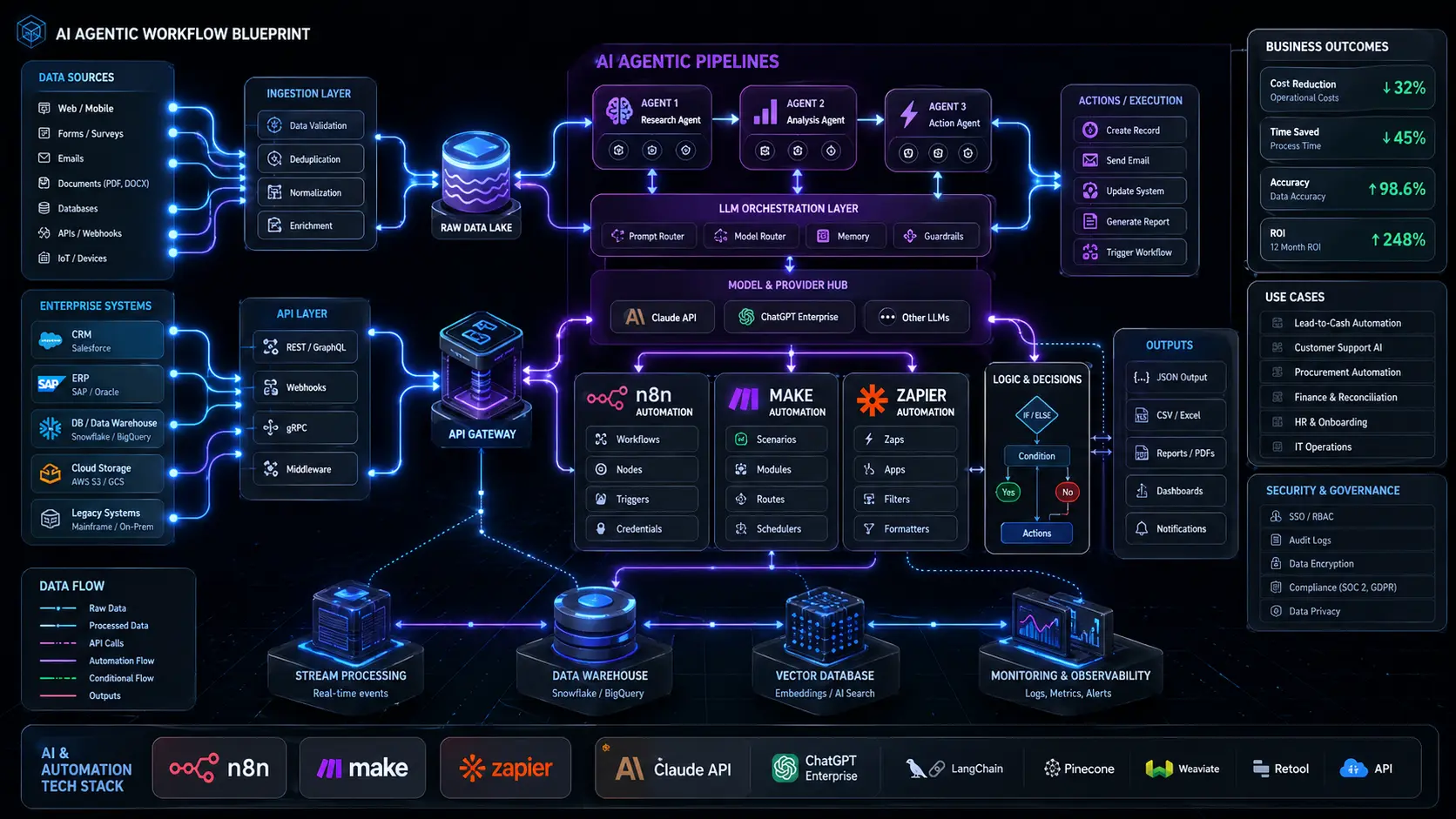
top enterprise AI tools for workflow automation and agentic pipelines 2026

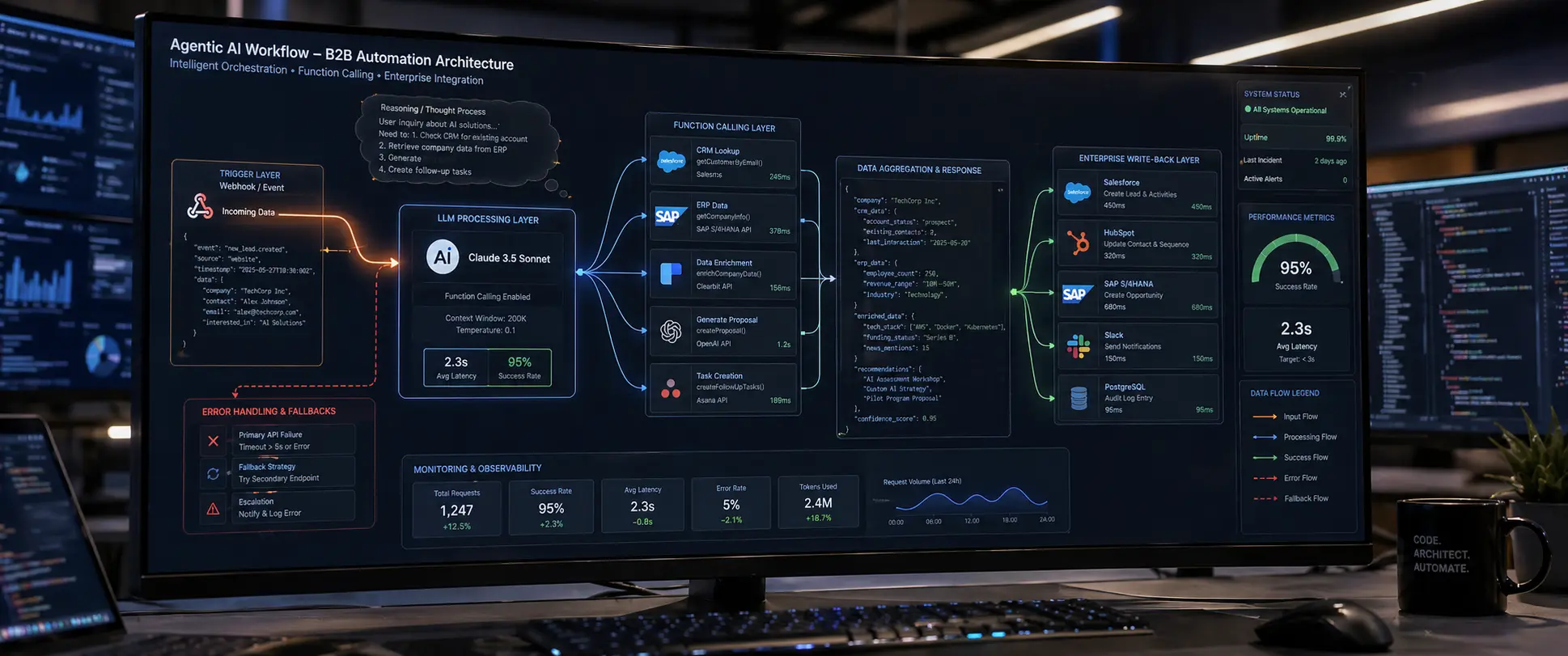
Most enterprise teams are still treating AI as a smarter search box — paste a question, copy an answer, repeat. That’s not workflow automation. Real enterprise workflow automation means AI tools that trigger on events, call external APIs, parse structured JSON from third-party systems, execute conditional logic, and write back to your CRM or ERP without human intervention. The gap between where most businesses are and what’s now technically achievable is significant — and closeable, if you choose the right tools and architect them correctly.

This guide is written from the perspective of someone who has deployed these systems in production environments: an automation architect who has connected ChatGPT and Claude APIs into live invoice processing pipelines, built agentic lead qualification workflows in n8n, and integrated Gemini’s document intelligence into multi-step approval chains. What follows is a technically grounded, opinionated breakdown of the 10 AI tools that are delivering real enterprise ROI in 2026 — with concrete workflow blueprints and honest assessments of their limitations.

The target here is not the 50-person company experimenting with Zapier. It’s the operations lead, automation engineer, or technical founder building systems that need to scale, stay secure, and integrate cleanly with existing enterprise infrastructure.

✍️ By GPTNest Editorial · 📅 April 29, 2026 · ⏱️ 15 min read · ★★★★★ 4.9/5

Before You Dive In — 5 Principles for Enterprise Automation Architecture

Think in triggers and actions, not features. Every enterprise workflow reduces to: an event fires, an LLM processes, a system updates. Evaluate tools by how cleanly they support this loop — not by their marketing page.
API-first means you own the logic. Tools with robust APIs let you control token usage, inject system prompts with grounding context, and swap LLM providers without rebuilding your pipeline. No-code wrappers that obscure the API create lock-in.
Latency compounds in multi-step workflows. A five-node agentic pipeline where each LLM call averages 2 seconds adds up to 10+ seconds of synchronous wait time. Design for async where possible and cache deterministic outputs aggressively.
Data anonymization is a prerequisite, not an afterthought. Before any customer PII or proprietary business data hits a third-party LLM API, it must be stripped or pseudonymized. Build this into your ingestion layer, not your prompt.
Cost control lives in token engineering. In production, the difference between a well-engineered system prompt (200 tokens) and a bloated one (1,800 tokens) multiplied across 50,000 monthly API calls is a material budget line item. Compress ruthlessly.

10

Enterprise AI Tools Reviewed

7

Live Workflow Blueprints

B2B

Real Production Use Cases

15m

Average Read Time

What This Guide Covers

n8n — Orchestrating Enterprise AI Tools for Sensitive Data

Best for: data-sensitive enterprises, complex multi-step agentic pipelines, API-heavy integrations

🏆 Top Pick

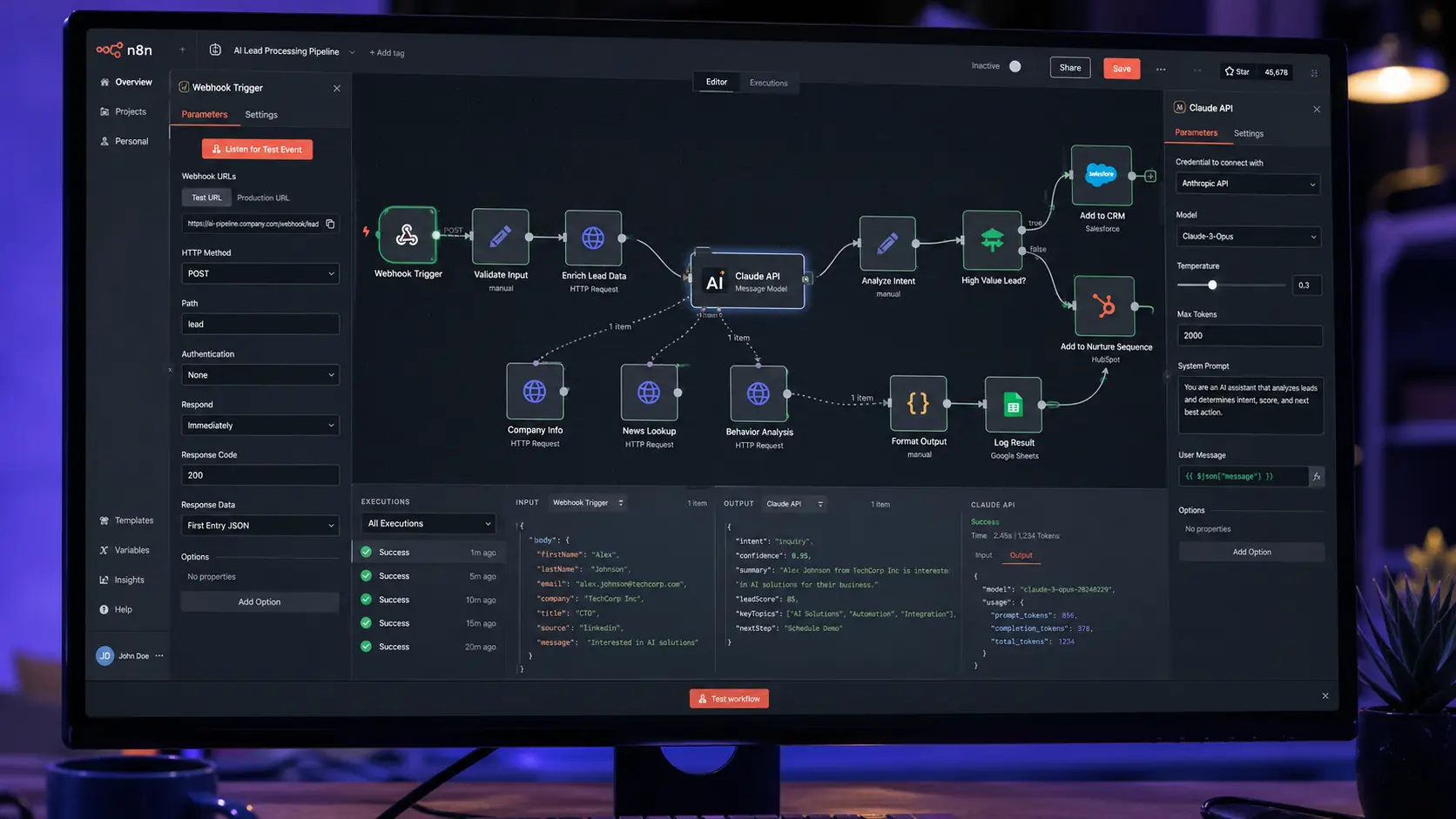
n8n is the most architecturally serious tool in this list for enterprises that need to own their infrastructure. Unlike SaaS automation platforms, n8n can be self-hosted on your own server or VPC, meaning no customer data leaves your perimeter before you’ve explicitly decided it should. Its node-based visual editor supports complex conditional branching, webhook triggers, HTTP request nodes for raw API calls, and native LLM integrations with OpenAI, Anthropic, and Ollama.

The real power emerges when you chain LLM nodes with data transformation steps. A practical architecture for automated invoice processing: an IMAP email trigger fires when a new PDF arrives, a Code node extracts the attachment, an HTTP Request node sends it to the Claude API for structured JSON extraction (vendor name, invoice number, line items, total), a Switch node routes based on invoice value thresholds, and a final node writes the parsed data to your ERP via webhook.

Workflow Blueprint — Automated Invoice Processing

Trigger: IMAP / email webhook receives PDF attachment → Extract: Code node strips binary, base64-encodes → LLM Call: Claude API with structured extraction prompt → Parse: JSON node validates schema → Route: Switch node on invoice value → Write: HTTP POST to ERP webhook endpoint

Technical Prerequisites

Node.js 18+, Docker for self-hosted deploy, outbound HTTPS to LLM API endpoints, webhook URL accessible for inbound triggers, API keys stored as n8n credentials (never in workflow JSON). For PDF parsing, pair with a Tika or pdfplumber sidecar service.

💡 Architecture Note

n8n’s “AI Agent” node supports tool-calling loops natively — it will re-call tools until a stopping condition is met, enabling genuine agentic behavior without custom code. Use this for workflows where the LLM needs to query a database, check an API, and make a decision before writing a result.

⚠️ Honest Limitation

n8n’s error handling for long-running agentic loops requires careful configuration. Without explicit retry logic and timeout guards, a stuck LLM call can block an execution indefinitely. Build dead-letter queues and alert webhooks into any production workflow from day one.
Make (Integromat) — Visual API Workflow Engine

Best for: rapid prototyping, SaaS-to-SaaS integrations, teams without dedicated DevOps

Make occupies an important middle ground: more powerful than Zapier for complex data mapping and branching, less infrastructure-heavy than n8n. Its OpenAI and Anthropic HTTP modules let you build GPT-4o or Claude-powered steps with full control over request headers, JSON body structure, and response parsing — without writing any server-side code. For B2B teams that need to move fast and don’t have the bandwidth to manage self-hosted infrastructure, Make hits the right balance.

A strong production use case is automated lead qualification from form submissions. The workflow: a Typeform or HubSpot form submission triggers the scenario, an OpenAI module scores the lead against your ICP criteria using a structured system prompt, a Router splits high/mid/low-fit leads, and a CRM module creates the contact with an automatically populated qualification score field and AI-generated follow-up note.

Workflow Blueprint — AI Lead Qualification

Trigger: HubSpot form submit webhook → LLM: OpenAI GPT-4o with ICP scoring prompt, output as JSON (score 1–10, fit_reason, suggested_action) → Route: Filter module on score threshold → CRM Write: Update HubSpot contact with score + note → Notify: Slack message to sales rep for score ≥ 7

Key Make Advantage Over Zapier

Make’s “Iterator” and “Array Aggregator” modules let you process batches of records in a single scenario execution — critical for bulk operations like enriching 200 CRM contacts overnight or processing a week’s worth of support tickets in one scheduled run.

📖 Real Case — B2B SaaS, Sales Ops Team, 2026

A 12-person sales team was manually qualifying 80+ inbound demo requests per week, spending roughly 3 hours daily on initial screening. They built a Make scenario connecting HubSpot, OpenAI, and Slack. The LLM node receives company name, role, team size, and use case description. It returns a structured JSON object with an ICP fit score, a one-sentence reason, and a recommended next step. Reps now receive a Slack notification only for leads scoring 7 or above — with the qualification summary pre-written. First-contact response time dropped significantly, and rep focus shifted entirely to high-fit conversations.

n8n visual workflow canvas showing agentic AI pipeline with LLM processing, webhook triggers, and CRM integration nodes

OpenAI Assistants API — Stateful Agent Architecture

Best for: persistent conversation threads, file search RAG, function-calling agents

⚡ High ROI

The OpenAI Assistants API introduces a persistent execution model that solves one of the core pain points in enterprise chatbot deployments: state management. Rather than reconstructing conversation context by stuffing prior messages into each API call (and burning tokens at scale), Assistants maintain a Thread object server-side. Your application passes a Thread ID, appends a new message, and runs the Assistant — context is managed by OpenAI’s infrastructure.

For enterprises, the most valuable capability is the combination of File Search (vector store RAG over uploaded documents) and Function Calling (structured tool use). A practical architecture: upload your product documentation, pricing sheets, and support knowledge base as files, attach them to a vector store, and configure function definitions for your internal APIs (look up order status, create support ticket, query inventory). The assistant searches relevant documents, calls functions as needed, and synthesizes a grounded response — without hallucinating inventory numbers or pricing because it’s drawing from your actual data.

Workflow Blueprint — Internal Support Knowledge Agent

Setup: Upload PDFs to vector store, define function schemas for CRM/ERP lookups → Runtime: User message → create Thread → add Message → Run Assistant → poll for completion → retrieve Messages → return response → Scale: One assistant configuration, unlimited concurrent threads

Token Cost Calculation

File Search retrieval costs are billed separately from completion tokens. For a 100-document knowledge base with 50 daily queries, estimate vector store indexing cost once at setup, then roughly 1,000–2,000 retrieval tokens per query. Model completion tokens depend on response length. Budget both in your cost model before going to production.

Anthropic Claude API — Long-Context Document Intelligence

Best for: complex document analysis, legal/financial data extraction, multi-document reasoning

Claude’s 200K token context window is not a marketing number — it has genuine architectural implications for document-heavy enterprise workflows. The ability to load an entire 150-page contract, a full year of financial statements, or a complete RFP response document into a single API call eliminates the chunking and retrieval complexity that makes RAG pipelines expensive to build and brittle to maintain. For use cases where the document itself is the context, Claude frequently outperforms RAG-based approaches on accuracy while reducing pipeline complexity.

The practical workflow for automated contract review: load the contract as a document object in the API messages array, include a structured system prompt with specific extraction targets (parties, term dates, liability caps, auto-renewal clauses, governing law), and request JSON output with a defined schema. The response can be parsed and written directly to your contract management system via webhook. For a law firm or procurement team processing dozens of contracts weekly, this architecture reduces first-pass review time from hours to minutes per document.

Workflow Blueprint — Automated Contract Data Extraction

Trigger: New PDF uploaded to S3/Drive → Fetch: Lambda/Cloud Function retrieves document bytes → API Call: Claude API with document + extraction schema prompt, response_format JSON → Validate: JSON schema check on output → Write: POST to contract management system webhook

When to Choose Claude Over GPT-4o

Choose Claude when: (1) the document is longer than 30 pages and chunking would lose cross-section context, (2) instruction-following precision matters more than creative generation, (3) you need consistent structured JSON output at scale. GPT-4o holds an advantage for multimodal tasks requiring image interpretation within documents.

LangChain / LangGraph — Custom RAG and Agent Pipelines

Best for: engineering teams building custom AI infrastructure, complex state machine agents

LangChain remains the most widely used Python framework for building RAG pipelines and tool-augmented agents, but LangGraph is where serious enterprise agentic architectures are being built in 2026. LangGraph models agent workflows as directed graphs with explicit state objects, conditional edge routing, and human-in-the-loop interrupt nodes. This makes it production-ready in a way that simple ReAct agents are not — you can pause execution, require human approval for high-stakes actions, and resume with full state preservation.

Core LangGraph Architecture Pattern

State: TypedDict defining all shared variables → Nodes: Python functions that read/write state → Edges: Conditional routing logic (e.g., if confidence < 0.7, route to human review) → Checkpointer: PostgreSQL or Redis for state persistence across async runs

Honest Complexity Assessment

LangChain/LangGraph is not a no-code tool. Plan for a backend Python engineer with LLM API experience, proper test coverage for each node, and an observability stack (LangSmith or a self-hosted equivalent) to trace production runs. The overhead is justified for complex workflows; it’s overkill for simple API-to-CRM integrations.

Zapier AI — SME-Friendly Workflow with LLM Actions

Best for: non-technical teams, rapid SaaS integrations, straightforward single-step AI tasks

Zapier’s “AI by Zapier” action exposes GPT-4o and Claude directly inside Zaps, enabling non-technical operators to add AI steps to existing automations without writing a single line of code. For SMEs already using Zapier for Salesforce-to-Slack or Gmail-to-Sheets integrations, adding an LLM step is genuinely a 10-minute task. The prompt interface supports dynamic field injection, making it practical for summarizing emails, generating first-draft responses, or classifying incoming support tickets by department.

Where Zapier AI Wins

When your team is non-technical, your data flows are already in Zapier’s 6,000+ app ecosystem, and your AI steps are single-turn transformations (classify this, summarize that, extract this field). Speed to production is Zapier’s primary advantage.

Where Zapier AI Falls Short

Multi-step agentic loops, custom API authentication flows, large-document processing, and fine-grained token cost control are all significantly harder in Zapier than in n8n or Make. Treat it as a prototyping layer, not a production infrastructure decision for complex workflows.

Google Gemini API — Multimodal Document Extraction

Best for: PDF/image-heavy workflows, Google Workspace integrations, multimodal data pipelines

Gemini 2.0 Pro’s native multimodal capabilities make it the strongest choice for workflows that need to process mixed-format documents — PDFs with embedded charts, scanned invoices, product images with specifications overlaid, or presentation decks where visual layout carries meaning. Unlike text-extraction-then-LLM pipelines, Gemini can interpret both the visual structure and textual content in a single API call. For Google Workspace-heavy enterprises, the native Drive and Docs integrations reduce data movement friction significantly.

Workflow Blueprint — Scanned Invoice OCR + Extraction

Trigger: Google Drive file upload event → Fetch: Drive API retrieves file bytes → Gemini API: Send image/PDF with extraction prompt, request JSON schema output → Parse: Validate JSON, map to target schema → Write: Google Sheets append or ERP POST

Grounding with Google Search

Gemini’s API supports a “grounding with Google Search” parameter that tethers responses to current web data. For workflows requiring real-time market data, news-aware analysis, or current pricing verification as part of an AI step, this capability has no direct equivalent in OpenAI or Anthropic’s current API offerings.

Microsoft Power Automate — Compliant Enterprise AI Tools

Best for: Microsoft 365 enterprises, regulated industries, existing Dynamics/Teams stack

For organizations running Microsoft 365, Dynamics 365, and Azure, Power Automate AI Builder is the path of least resistance for AI workflow deployment — not because it’s the most powerful tool, but because it operates entirely within the Microsoft compliance and data residency boundaries your legal team has already approved. AI Builder’s prebuilt models (document processing, invoice extraction, sentiment analysis, form recognition) are production-ready for common enterprise document types with minimal configuration.

✅ Compliance Advantage

Power Automate AI Builder processes data within your Azure tenant boundary under your existing Microsoft Enterprise Agreement data processing terms. For GDPR-regulated or HIPAA-adjacent workflows, this eliminates the third-party DPA negotiation step required when sending data to OpenAI or Anthropic APIs directly.

CrewAI — Multi-Agent Task Delegation

Best for: parallel research tasks, role-specialized agent pipelines, content operations at scale

CrewAI’s framework models AI automation as a “crew” of specialized agents, each with a defined role, goal, and tool access, that collaborate on a shared task. In practice, this architecture excels at workflows that benefit from parallel specialization — a researcher agent pulls source material, an analyst agent synthesizes findings, a writer agent drafts the output, and a QA agent reviews for accuracy. Each runs independently, enabling genuine parallelism where LangChain’s sequential chains would create bottlenecks.

Workflow Blueprint — Automated Competitive Intelligence Report

Research Agent: Web search tool, pulls competitor news, product updates, pricing → Analysis Agent: Synthesizes signals, identifies strategic patterns → Writer Agent: Formats into structured report with sections → Output: Markdown/PDF report posted to Slack or Notion

Vapi — Voice AI for Automated Inbound Qualification

Best for: inbound call triage, appointment scheduling, after-hours sales qualification

Vapi is the most production-ready platform for deploying voice AI agents that handle real phone calls — inbound qualification, appointment booking, basic support triage — with latency low enough that callers don’t notice they’re talking to an AI on most conversation turns. The architecture: Vapi manages the telephony layer and speech-to-text, routes the transcript through your LLM of choice (configurable per assistant), and returns text-to-speech output. Post-call webhooks deliver structured call summaries and extracted data directly to your CRM.

⚠️ Regulatory Note

Automated voice calls are subject to jurisdiction-specific disclosure requirements. In many markets, AI agents must identify themselves at the start of a call. Build this disclosure into your agent’s system prompt opening as a hard instruction, not a soft suggestion. Consult legal counsel before deploying outbound voice AI in regulated sectors.

⚡ Tool Comparison Matrix — Enterprise Workflow Automation 2026

Objective comparison across the dimensions that matter for production enterprise deployments.

ToolDeploymentBest Use CaseTechnical ComplexityData Privacy
n8nSelf-hosted / CloudComplex agentic pipelinesMedium–High★★★★★ (self-hosted)
MakeSaaSSaaS-to-CRM integrationsLow–Medium★★★☆☆
OpenAI AssistantsAPIStateful RAG agentsMedium★★★☆☆
Claude APIAPILong-doc extractionMedium★★★☆☆
LangGraphSelf-hostedCustom state machine agentsHigh★★★★★
Zapier AISaaSSimple LLM transformationsLow★★☆☆☆
Gemini APIAPIMultimodal doc processingMedium★★★☆☆
Power AutomateAzure / SaaSMicrosoft 365 enterprisesLow–Medium★★★★★ (Azure tenant)
CrewAISelf-hostedMulti-agent parallel tasksHigh★★★★☆
VapiSaaS + APIVoice qualificationMedium★★★☆☆

🏆 Pro Tips: Security, Cost Engineering, and Prompt Grounding

Security Architecture Checklist

PII anonymization layer: Use a pre-processing step to strip or pseudonymize names, emails, and IDs before any data reaches a third-party LLM API. Reversible tokenization is preferable to deletion for downstream re-linking.
API key rotation: Rotate LLM API keys every 90 days minimum. Store in your secrets manager (AWS Secrets Manager, HashiCorp Vault), never in environment variables or workflow configuration files.
Output validation: Never pass raw LLM JSON output directly to a database write or webhook. Validate against a strict schema and reject malformed responses. Prompt injection through user-submitted content is a real attack vector in document-processing pipelines.

Token Cost Engineering

Compress system prompts aggressively. A 2,000-token system prompt multiplied by 100,000 monthly API calls is 200M tokens of overhead — often the largest cost line item in a production deployment.
Use prompt caching (Anthropic and OpenAI both support it) for stable system prompts. Cached tokens cost significantly less than uncached input tokens at scale.
Route simple classification tasks to smaller, cheaper models (GPT-4o mini, Claude Haiku) and reserve frontier models for complex reasoning steps. A tiered routing layer typically cuts API costs 40–60% without meaningful quality loss.
Set max_tokens at the API call level, not just in the prompt. An unbounded completion can produce 4,000 tokens when you needed 200 — and you pay for all of it.

💡 Prompt Grounding for Enterprise Accuracy

The single most effective way to reduce hallucination in enterprise AI workflows is grounding: providing the LLM with the specific, authoritative data it needs to answer correctly, rather than relying on its parametric knowledge. For document extraction, this means passing the document. For CRM lookups, it means fetching the record and injecting it into the prompt. For policy questions, it means retrieving the relevant policy section via RAG. Grounding eliminates the class of hallucinations caused by knowledge gaps — which, in production document workflows, is the dominant failure mode.

The enterprise AI automation stack in 2026 is mature enough that the technical barriers are largely solved. What separates teams getting genuine operational ROI from those stuck in endless proof-of-concept cycles is architectural discipline: clear trigger-to-action thinking, proper data anonymization before LLM calls, token cost control built in from day one, and output validation that treats LLM responses as untrusted input until validated against a schema.

Start with one workflow, one tool, and one measurable business outcome. Document the architecture, measure the cost per execution, validate the output quality over 500 real runs, then scale. The teams building the most sophisticated automation systems today started with a single invoice processing or lead qualification pipeline twelve months ago. The compounding value of production AI workflows is real — but it requires the same engineering rigor as any other production infrastructure investment.

⚡ Advanced Automation Patterns Worth Knowing in 2026

Agentic AI workflow architecture diagram showing trigger node, LLM processing, function calling, and enterprise system write-back for B2B automation

💡 Human-in-the-Loop Interrupt Nodes

For high-stakes automated decisions — approving vendor payments, escalating customer refunds above a threshold, flagging legal language in contracts — build an explicit human approval step into the workflow. LangGraph’s interrupt mechanism, or a simple Slack approval Zap, pauses execution and waits for a human confirmation before proceeding. This isn’t a limitation of the technology; it’s responsible architecture for consequential actions.

✅ Async Webhook Pattern for Long-Running LLM Tasks

For workflows where LLM processing takes more than 5–10 seconds (large documents, multi-agent research tasks), switch from synchronous polling to an async webhook pattern. Submit the job, store a job ID, return immediately, and configure a callback URL. When the LLM task completes, it POSTs the result to your webhook endpoint. This prevents timeout failures in serverless environments and decouples your application’s response latency from the LLM’s processing time.

⚠️ Avoid LLM Calls for Deterministic Operations

A common over-engineering pattern: using an LLM to extract a date from a structured JSON field that already contains an ISO 8601 timestamp. LLMs add latency and cost for every call. If a regex, a JSON path selector, or a simple conditional handles the task deterministically, use that. Reserve LLM calls for the steps that genuinely require language understanding — classification, summarization, extraction from unstructured text, generation. Mixing deterministic and non-deterministic operations in the right places is what separates expensive workflows from efficient ones.

More Enterprise AI & Automation Resources

Scroll to Top