⚙️ Automation 🔗 n8n & Make 🔥 Advanced 🆕 2026 Tutorial ✅ Updated April 2026

How to Automate 80% of Your Work: Advanced No-Code Workflows (n8n & Make) Beyond Zapier: webhooks, conditional routing, LLM qualification, and self-hosted architectures that scale

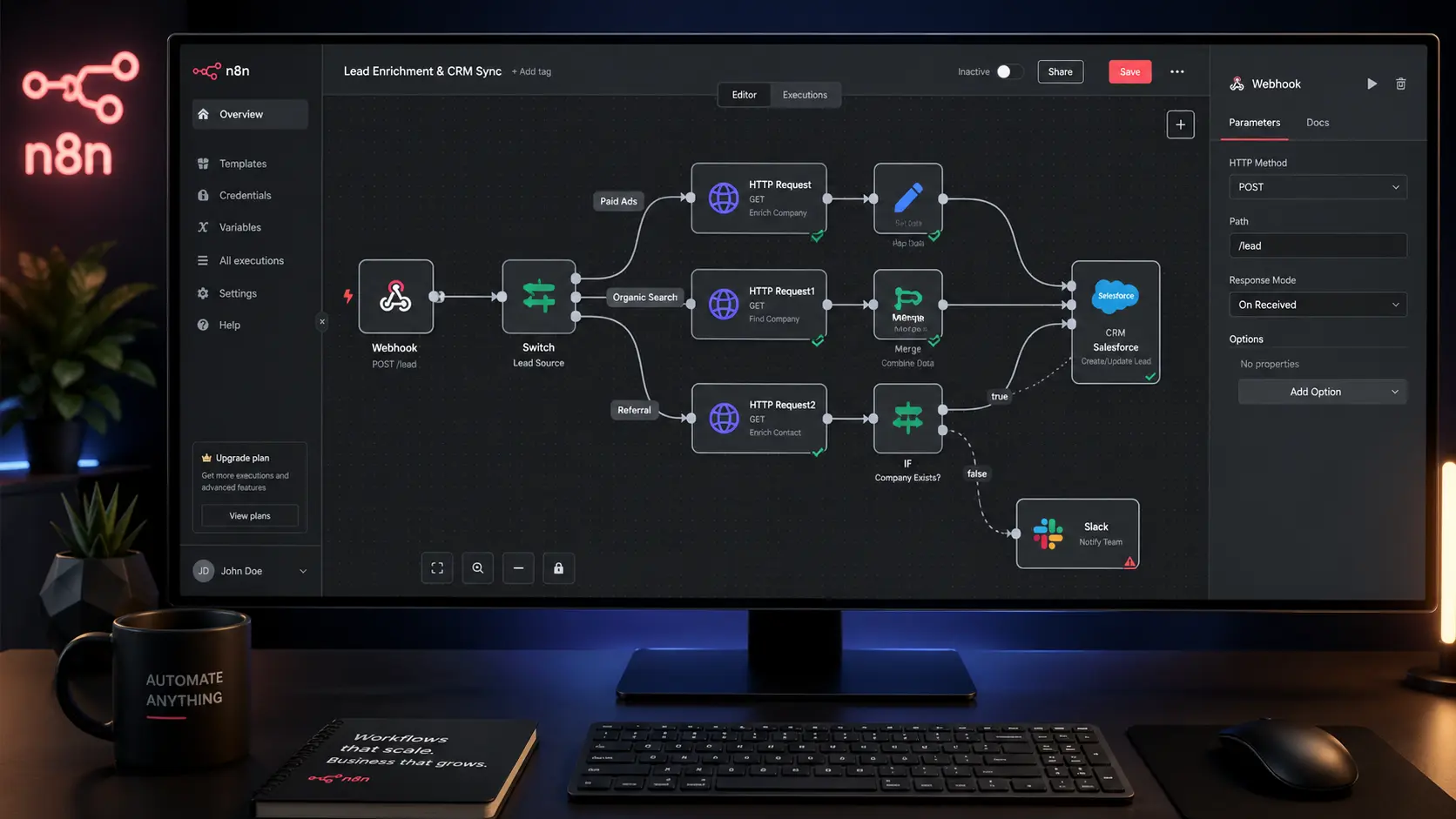
Advanced n8n workflow canvas showing webhook trigger connected to conditional routing nodes and CRM output for B2B automation

Most teams hit the same ceiling around month three of their automation journey. The initial Zapier setup works fine — a form submission fires a Slack notification, a new contact lands in a spreadsheet. Then the requirements grow. You need branching logic. You need an API call that depends on the output of the previous step. You need to handle errors without waking someone up at 2 a.m. That’s where basic automation tools stop, and where learning to automate complex B2B workflows with n8n and Make begins.

This isn’t about replacing a human with a bot. It’s about building workflow architectures that handle the repetitive, structured parts of your operation so your team can focus on the judgment-intensive work that actually requires them. The difference between an intermediate and an advanced automation practitioner is understanding how data flows, where logic should live, and how to build systems that degrade gracefully when something breaks.

What follows is a technical walkthrough aimed at agency owners, SME technical leads, and operations architects who are ready to move past linear trigger-action workflows. We’ll cover platform tradeoffs, the anatomy of a robust workflow, and a concrete step-by-step build: capturing a lead via Webhook, qualifying it with an LLM, and pushing the result to a CRM.

✍️ By GPTNest Editorial · 📅 April 29, 2026 · ⏱️ 15 min read · ★★★★★ 4.8/5

Before You Build — 5 Architecture Principles That Matter

Workflows fail at the edges. The trigger and the final output action are where most production failures happen. Design error handling at both ends before you build the middle.
JSON is the language of automation. Every node communicates via JSON. If you can’t read a JSON payload and identify where a value is nested, you’ll spend hours debugging what takes minutes once you can.
Branching logic separates tools. Zapier runs linear sequences. n8n and Make both support conditional routing, loops, and parallel branches — which is what real business processes actually look like.
API costs compound fast. LLM calls in automation loops can hit unexpected spend at scale. Always add execution counts and cost estimates before pushing to production.
Self-hosting changes the risk profile entirely. n8n’s self-hosted option puts credentials, data, and execution logs on your infrastructure — which is often non-negotiable in regulated industries or enterprise client engagements.

n8n

Self-Hosted Option

Make

Visual HTTP Modules

3

Workflow Architecture Layers

15m

Average Read Time

What You’ll Learn in This Guide

The Shift to Advanced Visual Builders — n8n Tutorial vs. Make

Why cost-per-task and linear flows are the real bottlenecks at scale

🔄 Core Concept

The fundamental issue with tools like Zapier at scale isn’t capability — it’s architecture and pricing. Zapier charges per task execution. Run a five-step Zap 10,000 times a month and you’re consuming 50,000 tasks. That number climbs fast in any real B2B operation. More importantly, Zapier’s linear, trigger-action model becomes a constraint when your actual business logic requires branching: “if the lead’s company size is over 50, route to enterprise sales; if it’s under 10, send to the self-serve sequence; otherwise, flag for manual review.”

Both n8n and Make.com solve these problems differently. Make operates on a scenario-based model with visual branching, built-in iterators, and a module library that covers nearly every SaaS API. Its HTTP Request module handles raw API calls with full JSON body mapping — no integration required if the endpoint exists. n8n goes further: it’s open-source, can run entirely on your own infrastructure, and supports JavaScript expressions at the node level, which gives you programmatic control inside a visual canvas.

Make.com — Best For

Teams who want a managed cloud platform with extensive pre-built integrations, clean visual scenario design, and predictable monthly pricing based on operations (not per-zap task). Strong for agencies managing multiple client accounts with role-based access.

n8n — Best For

Technical teams who need full data sovereignty, custom JavaScript logic inside nodes, or are building automation infrastructure for clients in regulated industries. Self-hosted n8n has no execution limits — only your server resources constrain throughput.
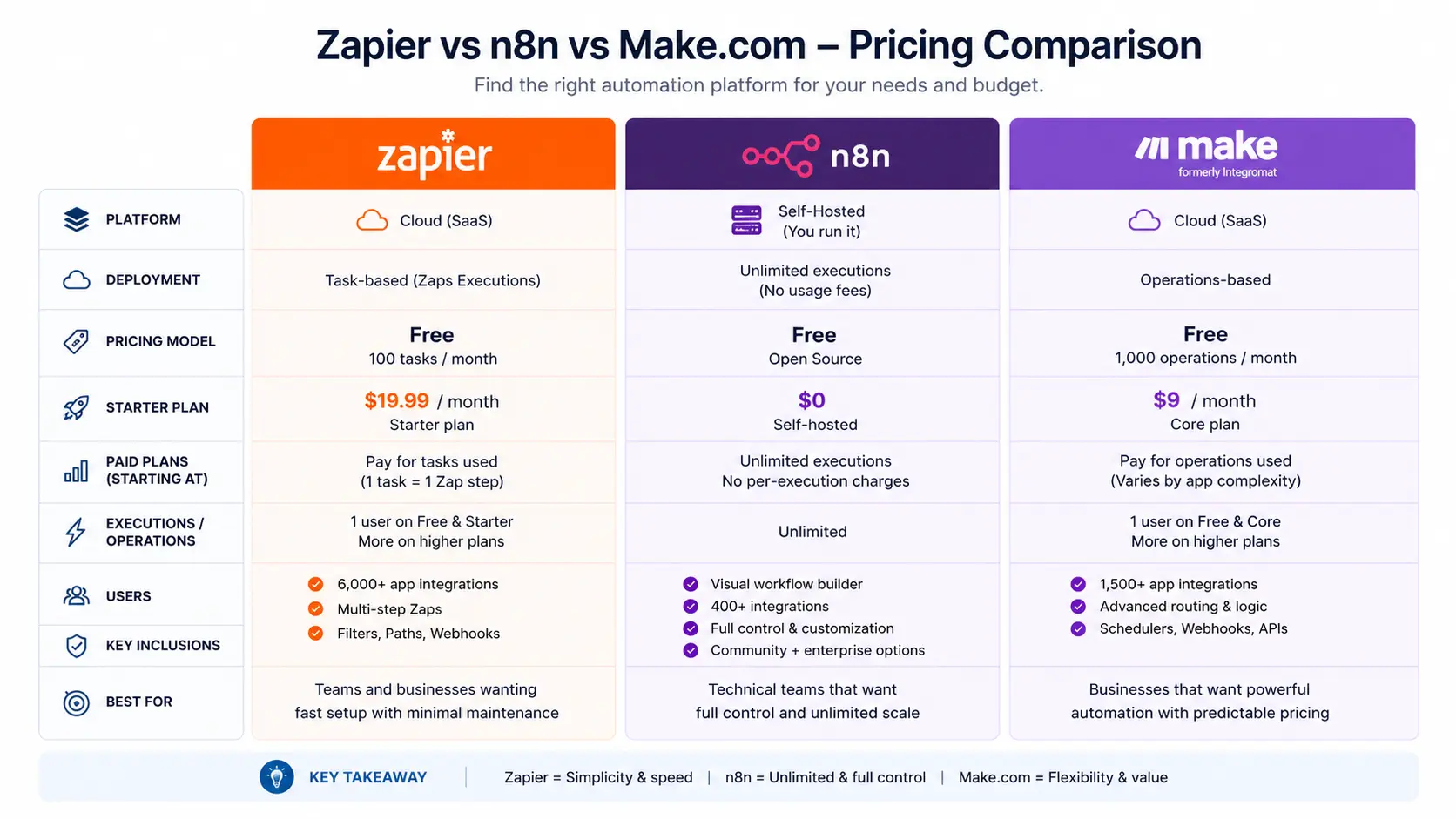
Side-by-side pricing and capability comparison of Zapier vs n8n self-hosted vs Make.com for enterprise workflow automation

💡 Key Insight

The decision between Make and n8n isn’t purely technical — it’s an operational question. If you’re managing automation for clients, Make’s multi-account structure and UI are easier to hand off. If you’re building internal infrastructure where data privacy or unlimited execution scale matters, n8n self-hosted is the correct architectural choice.
Anatomy of an Advanced Workflow — Triggers, Logic Nodes, Actions

How data moves and transforms through a production-grade automation

Every robust automation shares the same three-layer structure, regardless of platform. Understanding these layers is what separates a workflow that holds up under real conditions from one that breaks the moment data doesn’t arrive in the exact shape you expected.

Layer 1 — Trigger

The entry point. In advanced workflows, the trigger is almost always a Webhook rather than a scheduled poll. Webhooks are event-driven: an external system sends an HTTP POST to your unique endpoint the moment something happens. This means zero polling latency and no wasted API calls checking for changes that haven’t occurred.

Layer 2 — Logic and Transformation

This is where most of the architectural work lives. A Switch node (n8n) or Router module (Make) evaluates incoming data and routes it down different branches. Set nodes reshape or enrich the JSON payload. HTTP Request nodes call external APIs — including LLMs — and map the response back into the workflow’s data context.

Layer 3 — Output and Error Handling

Actions write data to its final destination: a CRM, a database, a Slack message, an email. Error handling nodes intercept failures at any step and route them — either to a retry branch, a fallback action, or an alert. In production workflows, every critical path needs an error branch. Without one, silent failures are unavoidable.

⚠️ Common Architecture Mistake

Building a workflow with no error handling in the output layer. When a CRM API returns a 429 (rate limited) or 500 (server error), the workflow silently fails and the lead is lost. Always add an error catch node on your final action that writes failed records to a dedicated retry queue or sends an immediate alert.

Step-by-Step Build: Automating Lead Qualification

A real B2B workflow: Webhook → LLM scoring → CRM routing

🛠️ Core Tutorial

The workflow we’re building captures an inbound lead from a website form, runs it through an LLM to generate a qualification score and summary, then routes the enriched record to the appropriate CRM pipeline stage based on that score. This is a pattern that applies equally to sales qualification, support ticket triage, and contract review intake. We’ll build it in n8n, with notes on equivalent Make modules where the implementation differs.

3.1

The Webhook Payload

In n8n, add a Webhook node as your trigger. Set the HTTP method to POST and note the generated URL — this is what your form submission endpoint (e.g., a Typeform webhook or a custom form) will target. Set the node to respond immediately with a 200 OK so the sender isn’t blocked waiting for your workflow to complete.

The incoming JSON payload from a typical B2B form submission will look something like this:

// Incoming webhook payload — raw JSON from form submission { “first_name”: “Sarah”, “last_name”: “Chen”, “email”: [email protected], “company”: “TechVentures”, “company_size”: “85”, “role”: “Head of Operations”, “use_case”: “We want to automate our client onboarding process including contract generation and CRM updates.”, “source”: “organic_search” }

After the Webhook node, add a Set node to normalize field names and cast types — company_size arrives as a string, so parse it to integer here. This keeps your downstream logic clean and avoids silent type-comparison failures in your Switch node.

3.2

The LLM Processing Node

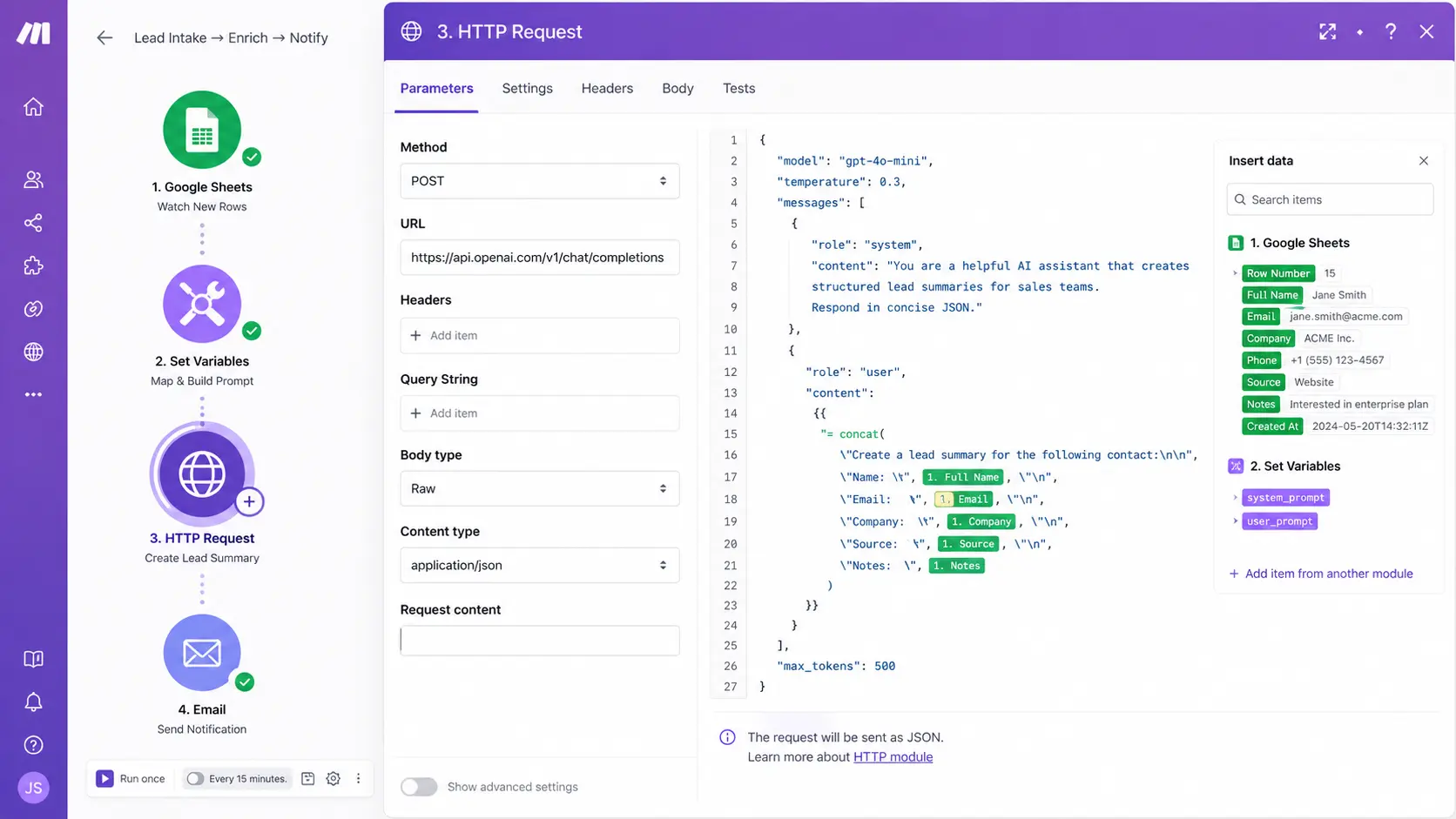
Add an HTTP Request node and configure it to call the OpenAI Chat Completions endpoint (or whichever LLM API you’re using). This is where Make and n8n converge — both use their HTTP Request module/node for raw API calls. In the request body, construct a JSON payload that passes the normalized lead data into a structured prompt:

// HTTP Request node — POST to https://api.openai.com/v1/chat/completions // Headers: Authorization: Bearer {{$env.OPENAI_API_KEY}}, Content-Type: application/json { “model”: “gpt-4o-mini”, “max_tokens”: 200, “messages”: [ { “role”: “system”, “content”: “You are a B2B sales qualification assistant. Return ONLY valid JSON.” }, { “role”: “user”, “content”: “Qualify this lead. Company: {{$json.company}}, Size: {{$json.company_size}}, Role: {{$json.role}}, Use case: {{$json.use_case}}. Return: {\”score\”: 1-10, \”tier\”: \”enterprise|mid-market|smb\”, \”summary\”: \”one sentence\”, \”next_action\”: \”string\”}” } ] }
Make.com HTTP request module configuration showing JSON payload mapping for LLM lead qualification API call

After the HTTP Request node returns, the LLM response is nested inside choices[0].message.content as a string. Add a second Set node that parses this string as JSON using n8n’s expression: {{JSON.parse($json.choices[0].message.content)}}. This extracts the structured qualification object and makes its fields addressable by downstream nodes.

💡 Pro Tip — API Cost Reduction

Use gpt-4o-mini instead of the full GPT-4o for qualification scoring — it’s roughly 25x cheaper per token and handles structured JSON extraction reliably. Add a max_tokens cap (200 is sufficient for a score, tier, and summary) so a runaway generation event doesn’t spike your API bill. Gate LLM calls behind a company_size threshold in a Switch node — leads under 5 employees rarely convert to enterprise contracts and don’t need scoring.

3.3

The CRM Output

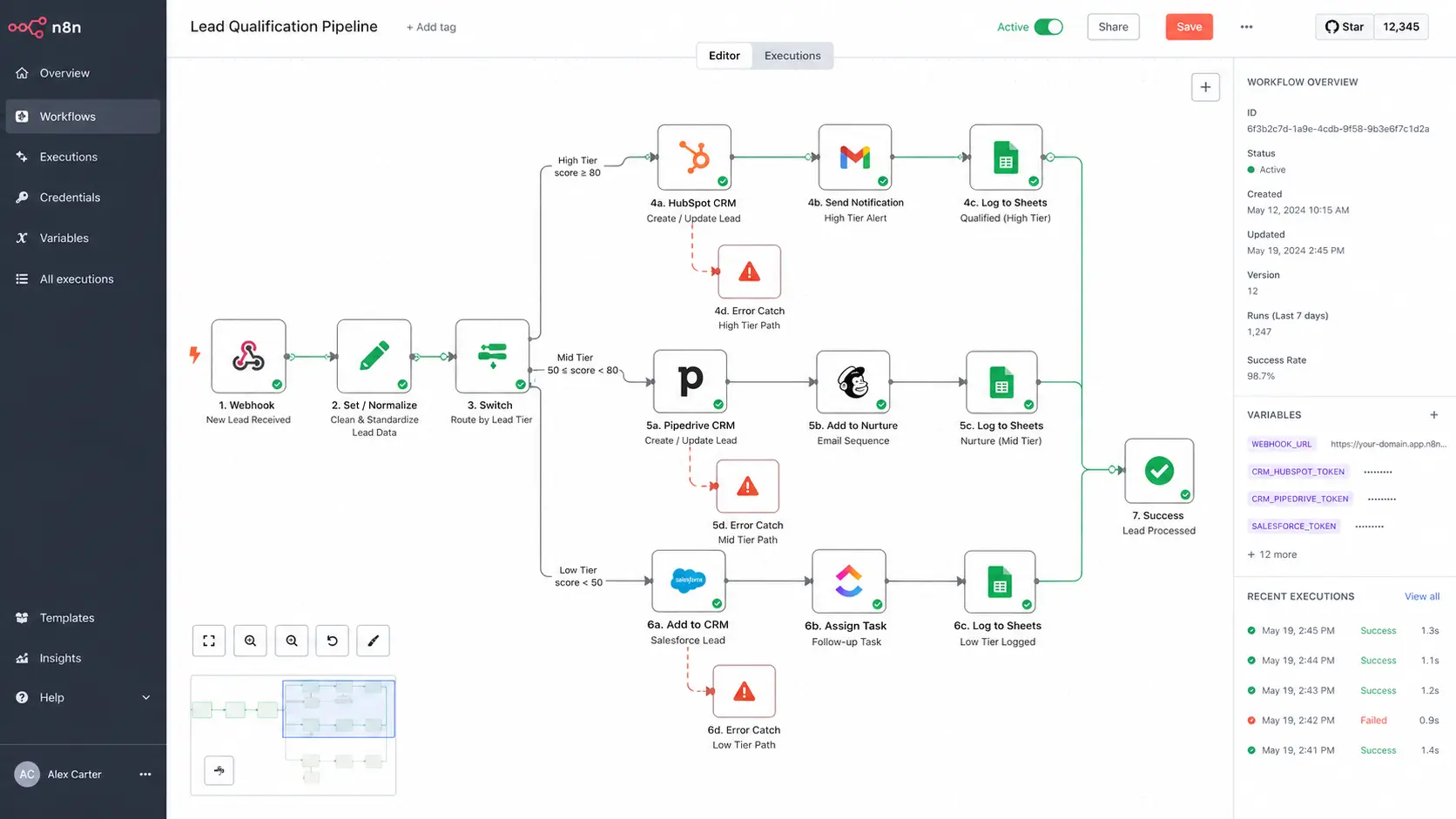
Now add a Switch node that reads the tier field from the LLM response and creates three output branches: enterprise, mid-market, and smb. Each branch routes to a different CRM action — typically a different pipeline stage, deal owner, or lead status in HubSpot, Pipedrive, or whichever system you’re using.

n8n tutorial - advanced workflow canvas showing webhook and LLM nodes 2026

For each branch, add an HTTP Request node calling your CRM’s contact creation or deal creation API. Map the fields from both the original webhook payload and the LLM output: the lead’s email and company from the webhook, the score, tier, and summary from the LLM JSON. Store the LLM summary in a custom CRM field so sales reps see it instantly when they open the record.

⚠️ Error Handling — Non-Negotiable

On each CRM output branch, add an Error Trigger node. Route failures to a separate HTTP Request that POSTs the raw lead payload plus the error message to a dedicated Slack channel or a fallback Google Sheet. This ensures zero lead loss even when your CRM API is temporarily unavailable. In n8n, enable “Continue on Fail” at the workflow level and use the IF node to check for error states explicitly.

📖 Agency Implementation — Marrakesh, 2026

A digital marketing agency managing lead gen campaigns for eight B2B clients was manually reviewing every inbound demo request before routing it to the right sales rep — roughly 40 minutes of sorting per day across the team. They implemented this three-node pattern in n8n (self-hosted on a €12/month VPS). After two weeks of tuning the LLM prompt, the system correctly categorized 91% of leads without manual intervention. The remaining 9% flagged as low-confidence were routed to a human review queue. The workflow runs approximately 300 leads per month with LLM costs under $4 total — less than a single hour of junior staff time.

Security and Self-Hosting Considerations

Data sovereignty, credential management, and when self-hosting is the right call

🔒 Critical

When automation workflows handle customer data — PII, contract terms, financial information — where that data is processed and stored is not a secondary concern. Both Make and n8n cloud process workflow data on their servers, which means customer data passes through a third-party system. For many B2B contexts, particularly in legal, financial, or healthcare-adjacent verticals, this is a dealbreaker.

Self-hosted n8n eliminates this vector entirely. Your workflow execution data never leaves your infrastructure. Credentials are stored encrypted in your own database. Execution logs are only accessible to your team. The setup requires Docker or a Node.js environment, a reverse proxy (nginx is standard), and SSL termination — technically approachable for any team with a developer or systems administrator.

Credential Security — Both Platforms

Never hardcode API keys inside workflow nodes. Both n8n and Make support credential stores — use them. In self-hosted n8n, credentials are encrypted at rest using an encryption key you control. Rotate API keys quarterly and use environment variables (N8N_ENCRYPTION_KEY) rather than embedding secrets in the workflow JSON.

Webhook Security

Webhook endpoints are publicly accessible URLs. Always validate incoming requests using a secret header or HMAC signature. In n8n, add an IF node immediately after the Webhook trigger that checks $headers['x-webhook-secret'] against your stored secret. Requests that fail validation should return a 401 and terminate — never process unauthenticated webhook payloads.

When to Self-Host n8n

Consider self-hosting when: (1) you handle client data under NDA or data processing agreements, (2) your workflow volume exceeds cloud plan limits, (3) you need audit logs stored internally for compliance, or (4) you’re building automation as a service and want unlimited execution at fixed infrastructure cost rather than per-operation pricing.

✅ Minimum Self-Hosting Stack

Ubuntu 22.04 LTS VPS (2 vCPU, 4GB RAM handles most production workloads), Docker Compose for n8n and PostgreSQL, nginx as reverse proxy, Let’s Encrypt for SSL, and daily automated backups of the PostgreSQL database. Total infrastructure cost for most agencies: €15–35/month. n8n’s official Docker Compose file ships with sensible defaults — customize environment variables before first launch.

⚡ Platform Comparison — n8n vs. Make vs. Zapier

Key architectural and commercial differences for B2B automation decision-making.

CriterionZapierMake.comn8n (Self-Hosted)
Pricing modelPer task executionPer operation/monthFixed infra cost
Branching logicLimited (Paths add-on)Full router & iteratorsFull Switch + merge nodes
Custom codeCode step (limited)Custom functionsJS expressions in every node
Data sovereigntyCloud onlyCloud onlySelf-hosted option
HTTP / API callsWebhooks moduleHTTP Request moduleHTTP Request node + auth types
Error handlingBasic error pathsError handlers per moduleError Trigger + continue-on-fail
Learning curveLowMediumMedium–High

🏆 Pro Tips for Production-Ready Workflows

Before You Deploy

Test with real payloads: Use your Webhook node’s test mode to capture actual incoming JSON from your form or source system — never test with manually crafted data only.
Validate JSON parsing: The LLM output node is the most fragile step. Add a JSON schema validation check immediately after parsing. If the structure doesn’t match, route to error handling rather than letting bad data reach your CRM.
Execution log retention: In n8n, set execution data pruning to 30 days minimum. In Make, enable scenario history. You will need these logs the first time something breaks unexpectedly.

Cost and Scale Hygiene

Gate LLM calls with a pre-filter Switch node — qualify by company size or domain before spending tokens
Use smaller models (gpt-4o-mini, Claude Haiku) for structured extraction — reserve larger models for nuanced summarization tasks
Set API cost alerts in your LLM provider dashboard before volume surprises you at month end
Batch non-urgent workflows — not everything needs real-time processing; scheduled batches cut LLM request overhead

✅ The Most Impactful Single Change

If you’re currently running any automation without dedicated error handling, add that before building anything new. A workflow that silently drops records is worse than no automation at all — it creates the illusion of process while letting data fall through the cracks. Spend two hours adding error catch nodes and fallback alerts to your existing workflows. The reliability improvement will be immediate.

The ceiling on what you can automate with n8n and Make isn’t technical — it’s architectural. The teams building the most robust internal systems aren’t using more complex tools. They’re applying a consistent set of principles: event-driven triggers instead of polls, explicit error handling on every output, JSON validation at transformation points, and LLM calls gated behind cost-control logic.

Start with the lead qualification workflow in this tutorial. Run it in test mode for a week with real data before enabling it in production. Tune the LLM prompt based on what the qualification tier distribution looks like. Then extend the pattern to your next highest-volume manual process. That’s how you get to 80% automation coverage — one well-engineered workflow at a time, not all at once.

⚡ Advanced Workflow Patterns Worth Knowing

💡 Idempotency — Prevent Duplicate CRM Records

Add a lookup step before your CRM create action: search the CRM by email address. If a contact already exists, update the record instead of creating a duplicate. In n8n, this is an IF node comparing the search result count to zero. In Make, use a Router module. This single pattern eliminates the most common automation-caused data quality problem in CRMs.

✅ Webhook Replay for Debugging

Both n8n and Make capture raw webhook payloads in execution history. When you update your workflow and need to re-test against real historical data, use the “re-run from this node” feature instead of asking someone to resubmit a form. This speeds up iteration dramatically and ensures you’re testing against actual edge-case payloads rather than fabricated test data.

⚠️ Rate Limiting on External APIs

When your workflow processes high-volume batches, you’ll hit rate limits on CRM and LLM APIs. Add a Wait node (n8n) or Sleep module (Make) inside loops to enforce a delay between iterations. For LLM calls, implement an exponential backoff pattern using n8n’s retry configuration — start at 1 second, double on each failure, cap at 30 seconds. This keeps your workflow within API quotas without manual intervention.

More Automation & Workflow Resources

Scroll to Top