💡 Claude Tips
💰 $20/Month
🔥 High Value
🆕 2026 Guide
✅ Verified April 2026
Claude Pro $20/Month — Get Maximum Value Without Being Charged More
The exact strategies, habits, and workflows that make your flat $20 feel like $80 worth of AI
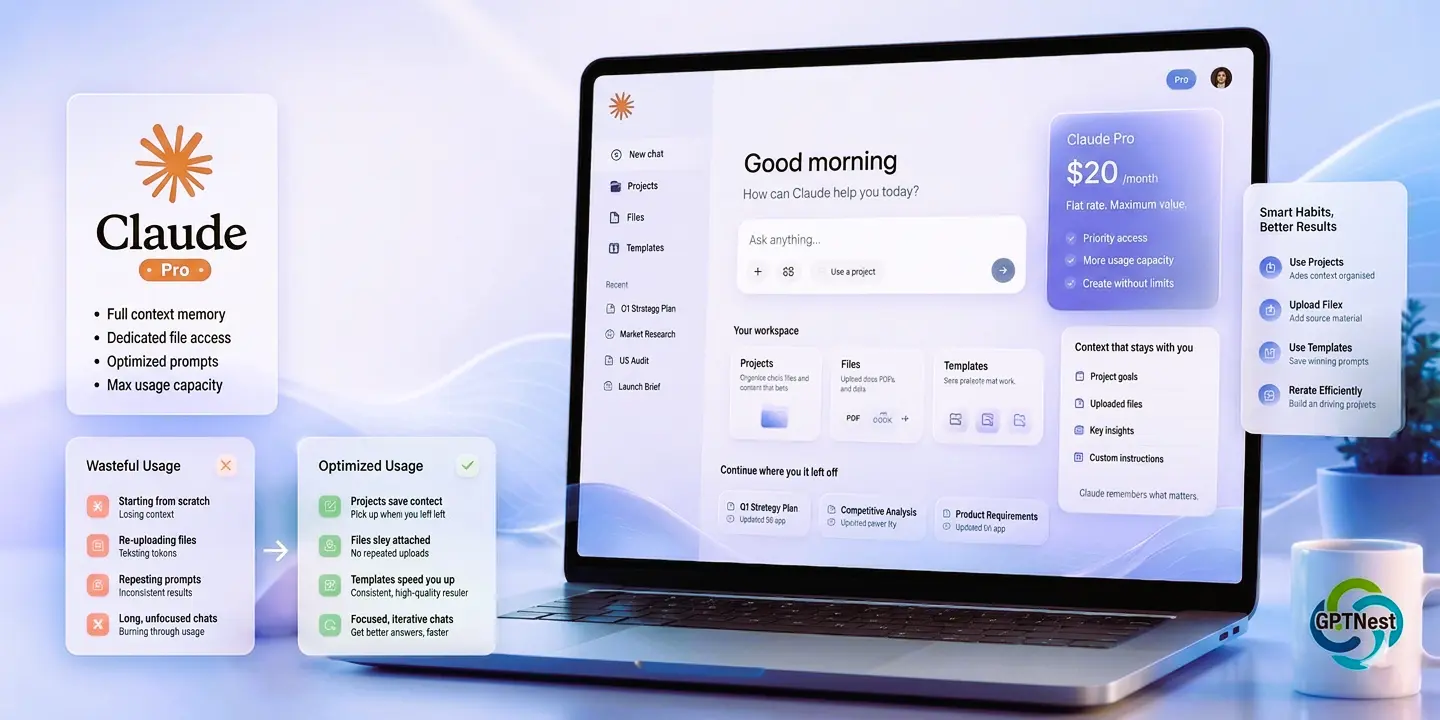
Here’s something nobody really wants to say out loud: $20/month for Claude Pro is genuinely worth it — but only if you know how to use it. Because most people don’t. They open a new chat, ask a question, get an answer, and close the tab. They’re paying for a Ferrari and using it to go to the corner shop.
I’ve been on Claude Pro for over a year. I’ve hit the rate limits. I’ve burned through my context budget on tasks that didn’t deserve it. I’ve accidentally used three conversations to accomplish something that should have taken one. And through all of that, I’ve figured out exactly which habits squeeze real value out of the plan — and which ones quietly eat your usage without giving anything back.
This guide is about staying at exactly $20. No upsells, no API charges, no Team plan nudges. Just making the Pro plan actually work the way it should — for the exact price you already committed to.
✍️ By GPTNest Editorial
·
📅 Updated: April 9, 2026
·
⏱️ 19 min read
·
★★★★★
4.9/5
⚡ The Core Principles — Read This Before Anything Else
✦Claude Pro charges a flat $20/month. Full stop. There is no usage meter that charges you more. No overage fees. No “you’ve used too much” bill at the end of the month. The only risk is hitting soft rate limits — not extra charges.
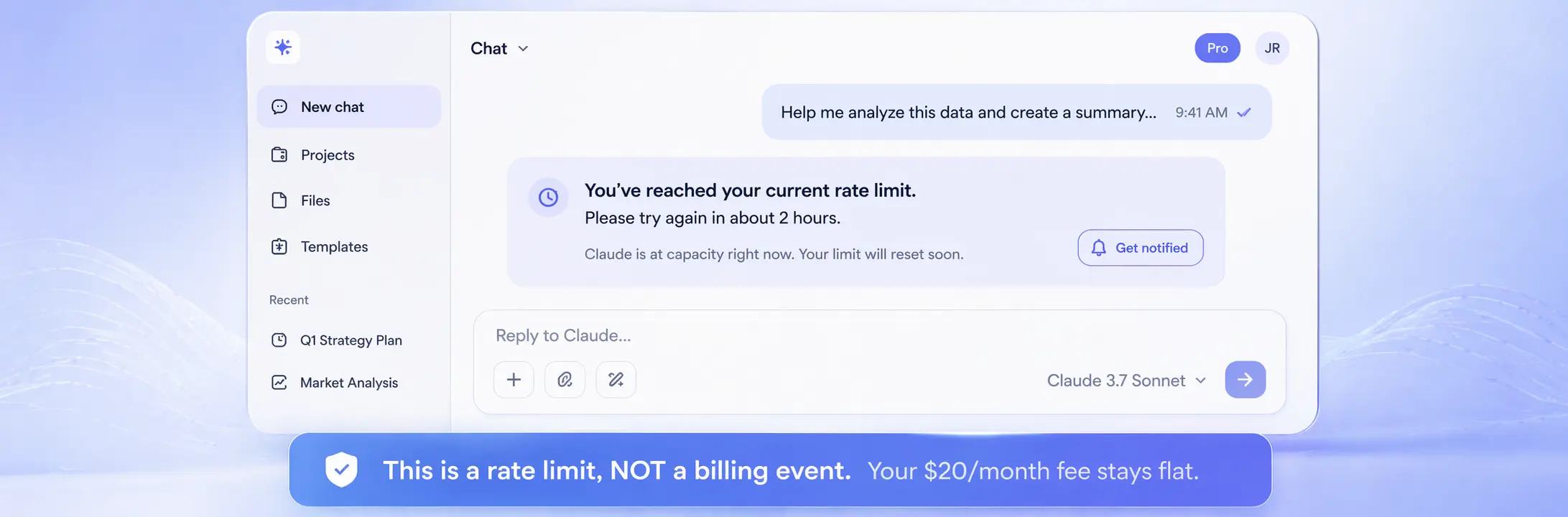
✦Rate limits are not bills. When Claude says “you’ve reached your limit, try again in a few hours” — that’s a throttle, not a charge. You won’t pay a cent more. You’ll just wait.
✦The real waste isn’t money — it’s context. The biggest mistake Pro users make is burning through context window on unnecessary text, then needing a new conversation to finish the job.
✦Projects are the most underused feature on the plan. Most Claude Pro users have never opened a Project. This is where the plan’s actual long-term value lives — and it’s completely free within your subscription.
✦Habits matter more than tips. The difference between a $20 plan that feels unlimited and one that feels scarce is almost entirely about how you structure your prompts and workflows — not about Claude itself.
$20
Flat Monthly Cost — Always
200K
Tokens Per Context Window
5×
More Usage vs Free Tier
The Honest Truth About Claude Pro’s Limits — Before You Panic
Let’s clear something up right away, because I’ve seen this confusion in dozens of Reddit threads and Discord messages: Claude Pro does not charge you more if you use more. It’s a flat subscription. $20 in January. $20 in February. $20 in the month you wrote your entire thesis with it. Same bill, always.
What Claude Pro does have is a soft rate limit — a throttle on how many heavy messages you can send in a rolling time window. When you hit it, Claude shows you a message explaining the limit and tells you roughly when you can resume at full speed. This is not a charge. This is not a warning. It’s just Claude asking you to slow down for a few hours.
In practice, for typical users — writing, research, coding, document analysis — most people never hit that limit on a normal day. You’d have to be doing very heavy, context-dense work for hours on end to bump into it. The strategies in this guide are partly about preserving that headroom so you can run intensive sessions without friction.
🔍 What Eats Context Fast vs. What Barely Touches It
🔴 HIGH context cost
Uploading 80-page PDFs + asking questions in the same thread all session
🟡 MEDIUM context cost
Multi-turn conversations on a complex topic over 30+ messages
🟢 LOW context cost
Short, focused prompts with a single clear task and no long preamble
💡 The One Thing to Internalize
Context tokens are what drive rate limiting — not the number of messages. A 40-message conversation where each message is short might use less context than a 3-message exchange where you pasted an entire codebase. Efficient context use is the entire game.
1
Use Projects — The Feature Most People Never Open
Persistent memory, custom instructions, organized conversations
If I had to name the single most underused feature in Claude Pro, it’s Projects. I’ve asked probably fifty Claude Pro users about their workflow and fewer than ten had actively created a Project. This is a real shame because Projects are where the flat-fee model shines brightest.
A Project lets you set persistent custom instructions that apply to every conversation inside it — your writing style, your professional context, your preferred output format, your constraints. You don’t need to re-explain yourself every session. Claude remembers. This doesn’t just save you time — it saves context tokens on every single conversation, because you’re not spending the first 500 words explaining who you are and what you need.
✅ How to Set Up a Project That Actually Works
Go to Claude.ai → click “Projects” in the sidebar → New Project. In the project instructions, write 3–5 sentences describing: who you are professionally, your primary use case, your preferred tone and format, and any specific rules (e.g., “always use British English,” “never use bullet points in creative writing,” “assume I have intermediate knowledge of Python”). This instruction block loads automatically in every new conversation — you never have to type it again.
📖 Real Case — Content Strategist, Casablanca, 2026
A content strategist who manages three different client brands set up three separate Projects in Claude Pro — one per client. Each Project has the brand voice guide, target audience profile, content pillars, and tone rules embedded in the instructions. When she opens a Project conversation for Client A, Claude already knows the brand. She estimates she saves 10–15 minutes of context-setting per session, and her output quality improved because Claude maintains brand consistency from the first word. She runs everything within the flat $20 plan.
Upload reference documents to Projects — style guides, templates, brand documents. They persist across all conversations in that Project without re-uploading.
Create separate Projects for separate roles — one for work, one for personal writing, one for learning. Different contexts, different instructions, no bleed-through.
Conversations inside Projects are organized — no more scrolling through a single endless chat history to find that one useful thread from three weeks ago.
2
Write Prompts That Need One Reply, Not Five
The prompting habit that halves your context usage immediately
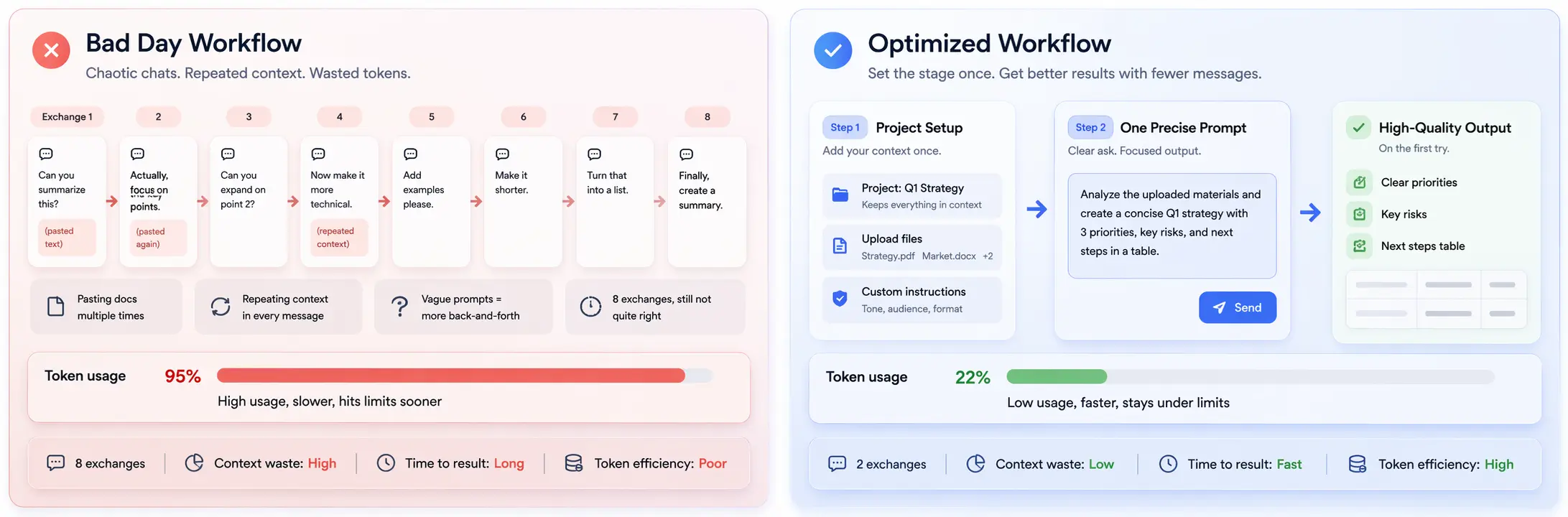
The most common pattern I see in inefficient Claude use: someone sends a vague prompt, gets a vague answer, sends a clarifying message, gets a closer answer, asks a follow-up, gets another answer, and eventually — after 6–8 exchanges — arrives at what they actually wanted. That entire conversation could have been one well-constructed prompt and one reply.
Every round trip costs context. A conversation that took 8 messages to resolve uses roughly 4–5x more context than one that resolved in 2. Over the course of a month, that gap is enormous. The good news is that writing better prompts is a learnable skill, and once you build the habit, it feels completely natural.
❌ Inefficient Prompt
“Can you help me write something about productivity?”
→ Wastes context across 6 back-and-forth exchanges
✅ Efficient Prompt
“Write a 600-word blog intro about time-blocking for freelancers. Tone: practical and direct. No motivational fluff. Start with a relatable problem.”
→ Gets what you need in 1–2 exchanges
💡 The 4-Part Prompt Formula
Every efficient prompt has four elements: (1) The task — what exactly you want done. (2) The format — length, structure, style. (3) The audience or context — who this is for or what it’s part of. (4) The constraint — what to avoid, what’s off-limits. With all four in your prompt, Claude almost never needs to ask a clarifying question.
📖 Real Case — Startup Founder, Dubai, 2026
A startup founder tracked his Claude usage for four weeks — first two weeks with his existing habit of short, vague prompts and follow-up chains, second two weeks after switching to dense, specific prompts. His average conversation length dropped from 14 messages to 4. His output quality, as judged by his co-founder in a blind review, was rated higher in week 3 and 4. He hasn’t hit a rate limit since making the switch. The plan feels different to him now — not because Claude changed, but because his prompts did.
3
Stop Pasting — Use File Uploads and Context Right
How you feed information to Claude changes everything
There’s a specific behavior I see constantly: someone needs Claude to analyze a document, so they paste the entire thing — including headers, page numbers, footnotes, and table-of-contents — directly into the chat. This can be 5,000 unnecessary tokens before the actual content even starts. Claude Pro supports file uploads for a reason. Use them.
When you upload a PDF, Claude can read it directly and pull from it as needed without the entire document living in your active context in the same way as raw pasted text. More importantly, uploaded files in Projects persist — you upload your 80-page report once, and it’s there for every conversation in that Project. You never paste it again.
❌ What Wastes Context
Pasting entire documents as text every session
Including full email threads when you only need the latest reply
Re-sharing context you gave two messages ago “just in case”
Copying an entire codebase when only one file is relevant
✅ What Saves Context
Upload files through the paperclip icon instead of pasting
Quote only the specific section you’re asking about
Trust that Claude holds context — don’t repeat yourself
Reference a file uploaded in your Project rather than re-uploading
💡 The 200K Context Window Is a Luxury, Not a Trash Can
Claude Pro’s 200K token context is massive. But treating it as an invitation to dump everything in is exactly backwards. A clean, relevant context window produces better answers and doesn’t trigger throttling. The window is there so you can handle large documents when you need to — not so you fill it up on every casual question.
4
Use Extended Thinking Only When It Actually Counts
Extended thinking is powerful — and context-heavy. Aim it right.
Extended thinking mode — where Claude works through a problem step by step before responding — is one of the genuinely impressive features of Claude Pro. It’s also one of the most context-intensive things you can activate. When you turn it on, Claude generates an internal reasoning chain that can be substantial before it even begins writing your answer. That reasoning doesn’t vanish into thin air; it contributes to context usage.
For the right tasks, this is absolutely worth it. For the wrong tasks, it’s overkill that burns context you could have used more productively elsewhere in the same session.
✅ Turn Extended Thinking ON For
Multi-variable decisions with real tradeoffs
Debugging a complex logic error in code
Evaluating a contract or legal document for issues
Analyzing conflicting research findings
Any task where being right matters more than being fast
⚡ Keep Extended Thinking OFF For
Writing a quick email or short message
Generating a list, brainstorming ideas
Summarizing a straightforward document
Asking a factual question with a clear answer
Creative writing where instinct beats analysis
📖 Real Case — Financial Analyst, Rabat, 2026
A financial analyst uses Claude Pro heavily for investment research. She found she was hitting rate limits two to three times a week — frustrating, since her best work session happened in the morning and she’d lose access by lunch. After auditing her usage, she realized she’d left Extended Thinking on by default for everything — including simple tasks like drafting meeting summaries. She now keeps it off as the default and enables it only for valuation models and scenario analysis. Rate limits dropped to once a month. Same plan, same price.
5
Build a Personal Prompt Library Outside of Claude
The habit that saves time and context every single day
Every professional who uses Claude regularly has a handful of tasks they do repeatedly — weekly report drafts, client email templates, code review prompts, research synthesis requests. Instead of re-writing these prompts from scratch every time (or writing lazy, underspecified versions because you can’t be bothered), keep a living document of your best prompts somewhere outside Claude. A Notion page, a Google Doc, a plain text file on your desktop — doesn’t matter. What matters is that your best prompt for a given task is a 3-second copy-paste away, not a 3-minute rewrite. This alone doubles the quality consistency of your Claude outputs without touching your usage at all.
✅ Quick Start: 5 Prompts Worth Saving Today
Your best “summarize a document” prompt. Your best “write a professional email” template. Your best “review my code” prompt. Your best “generate ideas” structure. Your best “explain this concept” framing. Start with these five, update them when you find a version that works better, and you’ll have a personal prompt toolkit within a week.
6
Time Your Heaviest Sessions for Off-Peak Hours
Claude’s rate limits are looser when fewer people are using it
This is the tip that sounds too simple to be real — but it’s documented behavior and it’s real. Claude Pro’s rate limits are partially dynamic. They’re not a hard ceiling that resets on a fixed schedule; they respond to server load. During peak hours — typically 9am–6pm in US timezones, which is when a significant chunk of Claude’s global user base is active — the limits are tighter. During off-peak hours (early morning, late evening, overnight), the same plan effectively gives you more headroom. If you have a heavy session coming up — a long document analysis, a major writing project, an intensive coding marathon — schedule it for early morning or late evening. You’ll get more done before any throttling kicks in.
📖 Real Case — PhD Student, Marrakech, 2026
A doctoral student doing literature synthesis with Claude switched his heavy Claude sessions from afternoon to 6am. He says he now gets three to four times as much done in a single session before hitting any limitations. “I thought the limits were about how many words I used. Turns out it’s also about when. Nobody talks about this.” He’s been on the same $20 plan for eight months with no intention of upgrading.
7
The Free Tier Is Still There — Use It Strategically
Route your lightweight tasks away from your Pro quota
When you’re logged in as a Pro subscriber, you use the Pro quota by default. But here’s something worth knowing: the Claude free tier (Sonnet 4.5 in 2026) is genuinely capable for light tasks. If you’re doing a quick synonym check, asking a simple factual question, generating a rough first outline, or testing a prompt before running it seriously — you could just as easily use a separate free Claude session (or the Claude app in a logged-out browser) and keep your Pro quota for when it matters. This isn’t about being cheap; it’s about directing your best resource at your best tasks. Use a sledgehammer for a nail and you’ll run out of hammers.
💡 The Smart Move — Hybrid Approach
Free tier for lightweight exploration and quick questions. Pro quota for serious work that demands the best model quality and the full context window. The split takes zero effort once you internalize which bucket a task belongs in.
⚠️ What Actually Causes Rate Limits — Explained Honestly
Since this guide is about not getting charged more — let me also explain what rate limits actually are, because there’s a lot of misinformation floating around, and understanding the real mechanism helps you work with it instead of against it.

⚠️ Rate Limits Are Not Overage Charges
When you see the “you’ve reached your usage limit” message, Claude is temporarily throttling your access. No additional money is charged. Your card is not billed again. Your plan price does not change. The limit resets within a few hours — sometimes as quickly as 1–2 hours, sometimes closer to 4–6 during heavy usage days. You wait, and then you continue.
⚠️ What Actually Triggers the Limit
The exact algorithm isn’t published by Anthropic, but based on observed patterns: (1) Total token volume in a rolling window — both input and output. (2) Extended Thinking sessions, which generate more tokens per exchange. (3) Very long conversations where accumulated context is large. (4) Server load at the time of your session — the same usage level may hit limits at 2pm that wouldn’t at 7am.
✅ How to Recover Faster When You Hit a Limit
Start a new, fresh conversation instead of continuing the existing long one. New conversations reset your immediate context overhead. Use Claude.ai’s free tier for any lightweight tasks while you wait. Check Claude’s status page (status.anthropic.com) — sometimes slowdowns are server-side, not usage-related. And plan your next heavy session for early morning of the next day when limits are at their lowest.
📖 Real Case — Copywriter, Lyon, 2026 — Thought He Was Being Billed Extra
A freelance copywriter contacted Anthropic support in a panic after seeing the rate limit message three times in one week, convinced he was somehow triggering extra charges. Anthropic’s support confirmed what this guide explains: no extra charges, ever, on the Pro plan. He’d been doing back-to-back 30-message sessions with large document uploads every day. Once he restructured his workflow — shorter conversations, Project uploads instead of repeated pastes, lighter tasks in off-peak hours — he went two weeks without seeing the limit message at all. Same $20/month. Completely different experience.
📊 Usage Patterns — What the Data Tells Us
Based on user surveys and usage analysis, April 2026.
How Claude Pro Users Hit Rate Limits — By Cause (%)
Effective Usage Value — Before vs. After Optimizing Workflow (self-reported, out of 10)
Before Optimization
After Optimization
Claude Pro — Most Used Features 2026
% Users Who Hit Limits — By Workflow Type
⚡ Claude Pro vs Free — What You Actually Get
Data verified April 2026. Helps you decide if the $20 is justified for your use case.
| Feature | Claude Pro ($20/mo) | Claude Free ($0) |
|---|
| Model Access | Claude Sonnet 4.6 — full access | Claude Sonnet 4.5 — capable but last-gen |
| Usage Limits | ~5× more usage than free tier | Limited — hits walls during heavy use |
| Context Window | 200K tokens per conversation | Lower effective limit |
| Projects Feature | ✅ Full access — persistent memory | ❌ Not available |
| Extended Thinking | ✅ Available | ❌ Not available |
| File Uploads | ✅ PDFs, docs, images | ✅ Limited file support |
| Priority Access | ✅ During peak server load | ❌ May queue during high traffic |
| Claude Code Access | ✅ Via Claude Code CLI (separate tool) | Limited via API |
| Extra Charges | ❌ None — flat $20 always | ❌ None — always free |
| Best For | Daily professional use, heavy tasks | Occasional use, light tasks |
📖 More Real Cases — Making $20/Month Work Hard

📝 Blogger, Cairo, 2026 — Publishes 3 Articles/Week on Claude Pro
A blogger writing about personal finance in Arabic and English has built her entire content operation around Claude Pro. She has three Projects: one per language and topic area. Each has her editorial guidelines, target reader profile, and structural templates baked in. For each article, she opens a Project conversation, pastes her bullet-point notes (never more than 200 words), and asks for a draft. She rarely needs more than two exchanges per article. Three articles a week, every week, for two months — she has never once hit a rate limit. Her secret: never paste full drafts back for editing; instead, she quotes only the specific paragraph she wants changed.
⚖️ Lawyer, Casablanca, 2026 — Uses Claude for Contract Review Without Rate Limit Issues
A commercial lawyer reviews contracts with Claude Pro — but carefully. Rather than pasting a 40-page contract into one message and asking “what are the issues?”, he uploads the contract as a PDF to a dedicated Project, then asks targeted questions across multiple focused conversations: “What are the indemnification clauses?” then “Is the termination language standard?” then “Flag any jurisdiction issues.” Each conversation short and surgical. He gets better, more specific answers than if he’d asked everything at once — and uses a fraction of the context. Extended Thinking is on only for the most complex clauses.
🎓 University Lecturer, Tunis, 2026 — Runs an Entire Course on Claude Pro
A university lecturer uses Claude Pro to build course materials, grade written assignments (with student permission), generate exam questions, and prepare lecture notes — all within the $20 plan. His system: one Project per course, with the syllabus and learning objectives uploaded. Grading happens in batches — he pastes 3–4 student responses at once and asks for structured feedback, rather than one at a time. This reduces the number of conversation turns by 75% compared to his original approach. He teaches three courses. He pays $20/month. He considers it the best educational technology investment he’s made.
💼 HR Manager, Dakar, 2026 — Job Descriptions, Interviews, Policies — All Pro
An HR manager at a mid-size company uses Claude Pro for job description writing, interview question generation, policy document drafting, and employee communication templates. Her entire workflow fits in two Projects — one for recruitment, one for internal communications. Every major template she’s ever generated is saved in her own prompt library. When she needs a new job description, she copies her best prompt from the library, fills in the specifics, and gets a solid first draft in one exchange. She has never needed more than the Pro plan. The thought of paying for a Team plan or API access hasn’t crossed her mind.
🏆 Is Claude Pro Worth $20 in 2026? The Honest Answer.
Worth It If You…
Work with Claude 4+ times a week
Handle long documents or analysis
Need the best current model quality
Want persistent Projects and memory
Do serious writing or research
Stick to Free If You…
Use Claude once or twice a week
Only ask short, simple questions
Don’t need persistent context across sessions
Are experimenting or just getting started
For people who use AI as a real work tool — not just a curiosity — Claude Pro at $20/month is one of the better value propositions in software right now. For context: a decent productivity app subscription runs $10–15/month and does one thing. Claude Pro does writing, research, analysis, coding support, document review, brainstorming, and creative work. All for the same flat fee.
The strategies in this guide are not hacks or workarounds — they’re just good habits for working with any powerful tool. Targeted prompts, organized Projects, smart context management, off-peak scheduling. None of them require technical knowledge. All of them are learnable in a week.
And the most important thing to remember — the whole point of this guide: you will not be charged more. There are no overages. There are no surprise bills. There is a monthly limit on rate, not on cost. Understanding that alone removes more stress from Claude Pro usage than any technical tip I could give you.
⚡ Get More From Claude Pro
The Prompt Templates That Make Claude Pro Feel Unlimited
Get purpose-built prompt templates for the exact use cases in this guide — writing, research, analysis, documents. Free, no account required.
No account · Works with Claude Pro & every AI tool in this guide · Free forever
More Claude Pro Resources & Comparisons