⚙️ Enterprise Automation 🤖 Agentic AI 🔥 2026 Blueprint 🆕 Updated Guide ✅ Updated May 2026

How to Automate Repetitive Tasks with AI: The 2026 Agentic Workflow Blueprint From the AI Systems Architect’s perspective: reasoning AI, orchestration stacks, and enterprise HITL design

automate repetitive tasks with AI - Enterprise agentic workflow architecture diagram showing AI orchestration with n8n, LLM APIs, and human-in-the-loop approval nodes

Seven years into managing technical pipelines across operations-heavy environments, I can tell you with certainty: the automation paradigm has broken. Not the concept of automation — the underlying architecture that most businesses are still running. The rigid, if-then logic of first-generation tools like basic Zapier triggers was never built for the data reality enterprises actually face when they try to automate repetitive tasks with AI. It was built for clean, structured, predictable inputs. That is not what your operations team is dealing with every day.

What we’re dealing with are emails written in ambiguous natural language, PDFs with inconsistent formatting, customer messages that contain three intents in a single sentence, and CRM records that haven’t been enriched in eighteen months. Traditional business process automation (BPA) hits a wall the moment the input deviates from its expected schema — which is most of the time.

The 2026 shift is toward agentic workflows: systems that don’t just trigger on conditions, but reason through ambiguity, evaluate unstructured inputs, and make contextual decisions before routing to the next step. This is the blueprint I use when transitioning operations from legacy automation to intelligent, scalable systems. It covers the identification framework, the architecture stack, three validated enterprise blueprints, and the HITL design principles that keep those systems trustworthy at scale.

✍️ By Senior AI Systems Architect · 7 Years in Pipeline Engineering & Systems Deployment · 📅 May 20, 2026 · ⏱️ 21 min read · ★★★★★ 4.9/5

Before You Read — 5 Architecture Realities When You Automate Repetitive Tasks with AI in 2026

If-then automation is a liability, not an asset. Brittle trigger chains break silently in production. Agentic systems handle deviation gracefully because they reason rather than pattern-match.
Unstructured data is the bottleneck, not the volume. The ROI of AI automation is almost entirely unlocked at the point where LLMs convert messy human inputs into structured, queryable records.
Orchestrators are the connective tissue. Tools like n8n and Make don’t replace LLMs — they coordinate them alongside your existing APIs, databases, and notification systems.
Human-in-the-loop is not a compromise. For high-risk financial approvals and edge-case routing, HITL is an architectural feature, not a failure of the automation to work correctly.
Automate frequency first, complexity second. The Automation Matrix in Section 1 will help you sequence which tasks to tackle before you write a single line of workflow logic.

73%

of enterprise data is unstructured — inaccessible to legacy BPA tools

4.2×

average ROI of AI automation vs. traditional rule-based workflow

~8h

weekly time recaptured per operations employee on high-volume tasks

n8n

Most adopted self-hosted orchestrator for enterprise LLM workflows in 2026

In This Agentic Workflow Blueprint

The Automation Matrix: How to Automate Repetitive Tasks with AI for High ROI

The engineering framework for sequencing automation investment

📊 Framework

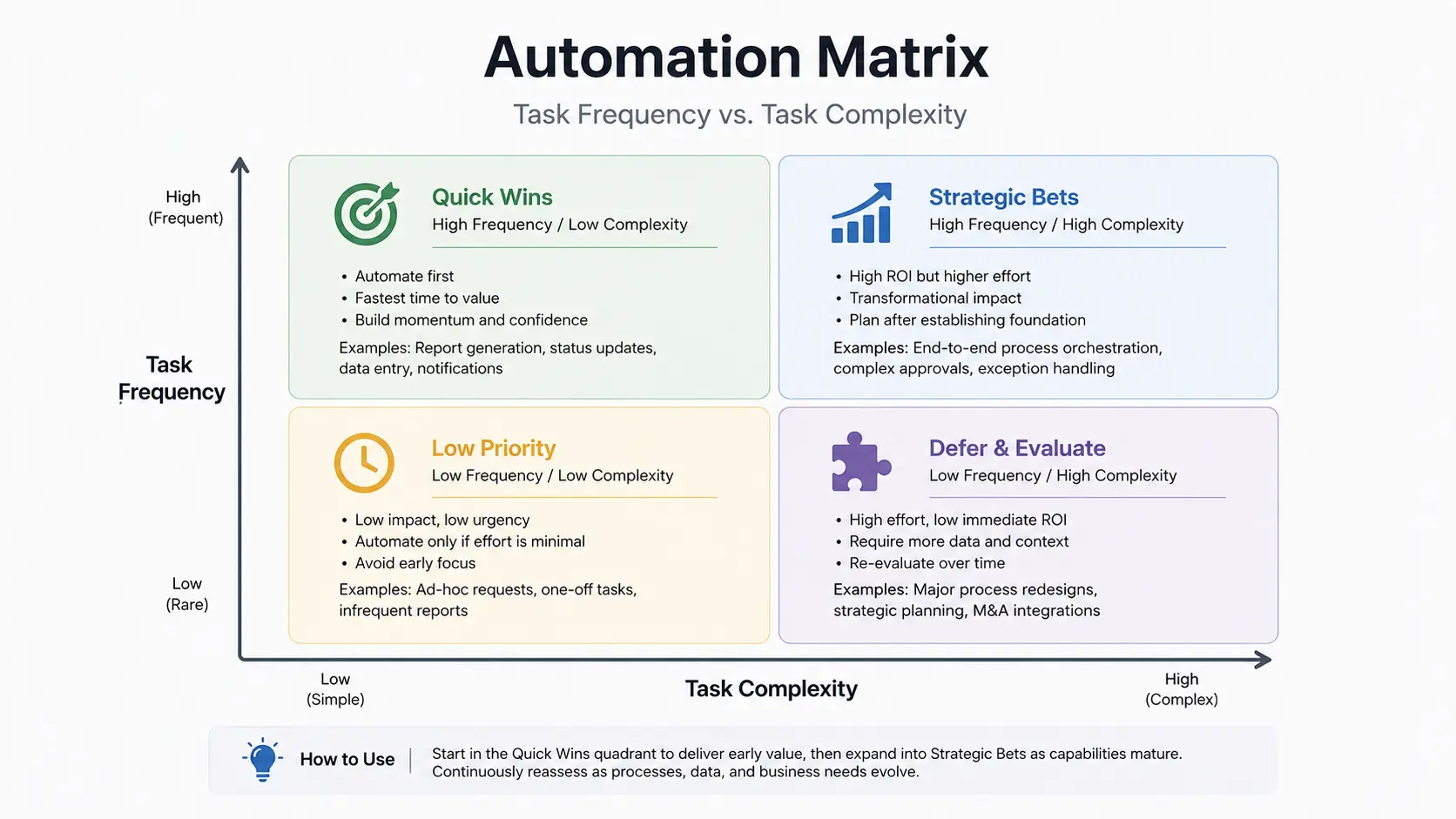
The first mistake operations teams make when they automate repetitive tasks with AI is automating what’s easy rather than what’s valuable. Easy automation targets — calendar invites, form acknowledgments, basic data duplication — tend to deliver single-digit percentage time savings. High-value automation targets are defined by two axes: task frequency and task complexity. Plotting your workflows against both dimensions reveals a sequencing strategy that maximizes early ROI and builds organizational confidence in AI systems before deploying more sophisticated agents.

Automation Matrix chart showing Task Frequency vs Task Complexity quadrants for enterprise workflow prioritization

The upper-left quadrant — high frequency, lower complexity — represents your quickest wins: invoice data extraction, support ticket triage, and routine CRM data entry. These deliver measurable ROI within weeks. The upper-right quadrant — high frequency, high complexity — is where agentic AI specifically earns its place: tasks that happen constantly but involve unstructured inputs, multi-step reasoning, or variable decision paths. This is where you deploy LLM-powered orchestration, not a rule-based trigger.

Quadrant 1 — Quick Wins (High Frequency, Low Complexity)

Invoice line-item extraction into ERP fields. Meeting note summaries from transcripts. Lead deduplication against CRM records. These are automatable with lightweight LLM calls and deliver fast payback on integration cost.

Quadrant 2 — Strategic Priority (High Frequency, High Complexity)

Multi-intent customer support emails requiring routing + sentiment classification + SLA flagging. Contract clause extraction with risk scoring. Agentic workflows with feedback loops are required here — not basic automation.

Quadrant 3 — Selective Automation (Low Frequency, High Complexity)

Quarterly reporting synthesis from multiple data sources. Regulatory compliance checks on new product documentation. Invest in these after proving ROI in Quadrant 1 and 2. The payback period is longer but the strategic value is high.

Quadrant 4 — Deprioritize (Low Frequency, Low Complexity)

Ad-hoc formatting tasks, occasional report reformatting, low-volume manual data moves. Automate last, if at all. Engineer time is better deployed in higher-impact quadrants.

💡 Architect’s Note on ROI Measurement

When calculating ROI of AI automation, include three cost categories: direct labor hours recaptured, error correction costs eliminated (data entry mistakes, misrouted tickets, missed invoice discrepancies), and opportunity cost of delayed decisions. The second and third categories are frequently underestimated and often exceed the first in enterprise environments.

The Core Shift: From Linear Triggers to Agentic Workflows

Why traditional “if-then” logic fails at the enterprise scale — and what replaces it

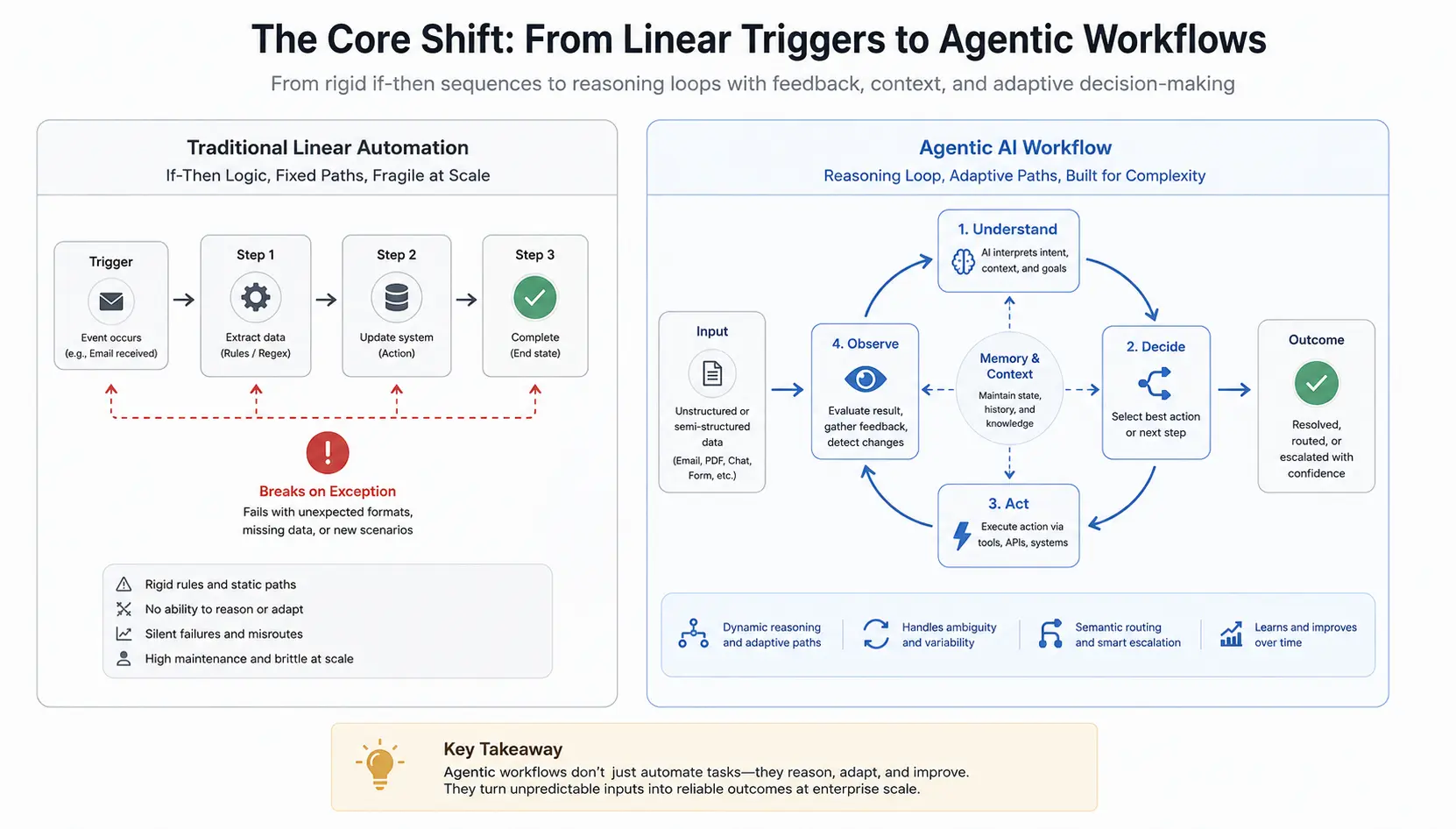
A traditional automation platform executes a fixed sequence: if event A occurs, perform action B, then action C. This works reliably when inputs are clean, predictable, and consistently formatted. The moment a customer support email contains a billing question nested inside a feature request — or an invoice arrives as a scanned PDF with a slightly different layout than last month’s — the trigger chain fails silently or routes incorrectly. In a high-volume environment where you automate repetitive tasks with AI, that silent failure compounds daily.

Agentic workflows replace the linear execution model with a reasoning loop. The AI agent receives an input, evaluates it against a set of objectives (not rules), takes an action, observes the result, and decides whether to continue, branch, or escalate. This feedback architecture is what allows an agentic system to handle the messy, ambiguous data that represents the majority of enterprise operational inputs in 2026.

Technical architecture diagram comparing traditional linear automation workflow against agentic AI workflow with feedback loops and semantic routing

How AI Parses Unstructured Data (Emails, PDFs, Audio) into Structured JSON

The technical bridge between messy human inputs and structured enterprise systems is the extraction layer — a combination of an LLM API call and a schema definition. When an email arrives, the agentic workflow passes its full text body to an LLM with a precise extraction prompt: “Extract the following fields as a JSON object — sender intent, urgency classification (low/medium/high/critical), product mentioned, and required action.” The model returns structured JSON that the orchestrator can then route, filter, and act on programmatically.

The same pattern applies to PDFs via a document parsing layer (converting to text via OCR or native extraction) and to audio via a transcription step before LLM processing. The critical architectural insight to automate repetitive tasks with AI successfully is that the LLM is not executing the workflow — it’s performing a single, well-scoped reasoning task as one node within a larger orchestration graph. Trying to have a single LLM call do everything is where most enterprise automation pilots fail.

// Example: LLM extraction prompt schema (n8n HTTP Request node) { "model": "claude-sonnet-4-20250514", "max_tokens": 512, "messages": [{ "role": "user", "content": "Extract the following from this support email as JSON only:\n{\n \"intent\": \"billing|technical|feature_request|churn_risk\",\n \"urgency\": \"low|medium|high|critical\",\n \"customer_tier\": \"inferred from context\",\n \"required_action\": \"string\"\n}\n\nEmail: {{$json[\"email_body\"]}}" }] }

✅ Semantic Routing vs. Keyword Routing

Legacy support routing systems matched on keywords: “refund” → billing team, “crash” → technical team. Semantic routing using an LLM evaluates meaning, not keywords. A message reading “the system keeps stopping my work and I can’t afford to lose this client” correctly classifies as both technical (critical) and churn_risk — and routes to both queues simultaneously. Keyword systems miss this entirely.

Architecting the Stack: Orchestrators (n8n / Make) + LLM APIs

The enterprise API integration layer that connects reasoning AI to operational systems

🏗️ Architecture

The orchestration layer is what separates a prototype from a production system. An LLM API call embedded within an n8n orchestrator workflow — connected upstream to your email or document ingestion system and downstream to your CRM, ERP, or ticketing platform — is the best way to automate repetitive tasks with AI at scale.

In enterprise environments transitioning away from legacy operations, I consistently recommend n8n over cloud-only alternatives for three reasons: self-hosting eliminates data residency concerns for regulated industries, the visual canvas provides a transparent audit trail that operations managers can review without engineering support, and the HTTP Request node gives direct access to any LLM API endpoint without vendor lock-in. Make (formerly Integromat) is a strong alternative for teams prioritizing rapid deployment over hosting control.

Layer 1 — Ingestion & Trigger

Email (IMAP/webhook), document upload (S3/SharePoint), form submission (Typeform/internal), or scheduled database query. This layer captures the raw, unstructured input that initiates the workflow.

Layer 2 — LLM Extraction & Classification

HTTP Request node calling the LLM API with a structured extraction prompt. Returns a JSON object with classified intent, extracted entities, and routing signals. This is the intelligence layer of the stack.

Layer 3 — Conditional Routing & Action

Switch nodes branch on the JSON output from Layer 2. High-urgency churn signals route to Salesforce + Slack alert. Standard billing queries route to Zendesk with an AI-drafted response. Financial approvals above threshold route to HITL queue.

Layer 4 — Logging & Audit Trail

Every workflow execution writes its input, LLM output, routing decision, and action taken to a structured log (PostgreSQL or BigQuery). This is non-negotiable for compliance and for continuously improving extraction prompt accuracy.

⚠️ Enterprise API Integration Security Note

Store all LLM API keys and downstream service credentials in your orchestrator’s credential vault — never hardcoded in workflow nodes. For workflows processing customer data, ensure your LLM API provider’s data processing agreement is compatible with your compliance posture (SOC 2, GDPR, HIPAA where applicable). Self-hosted n8n with a private LLM endpoint eliminates most of these considerations for regulated data.

3 High-Value Enterprise Automation Blueprints

Production-validated agentic workflow designs for operations teams

🔵 Production

These three blueprints represent the highest-ROI automation targets across the operations teams I’ve worked with over seven years. Each has been validated in production environments and addresses a task category where the mandate to automate repetitive tasks with AI creates exactly the bottleneck that agentic systems resolve.

Blueprint 1 Intelligent Invoice & Expense Reconciliation

Invoice processing is the canonical agentic automation use case because the inputs are high-frequency, semi-structured (PDFs with variable layouts), and the downstream consequences of errors — incorrect payments, missed discounts, duplicate charges — are financially material. A finance team processing 500 invoices per month manually is spending 40–60 hours on extraction, matching, and exception handling. An agentic system reduces that to under 4 hours.

Ingestion

Invoices arrive via email attachment or vendor portal upload. n8n monitors the inbox, extracts the PDF attachment, converts to text via a document parsing service (Textract, Azure Document Intelligence, or open-source alternatives).

LLM Extraction

The extracted text is passed to an LLM with a schema prompt: extract vendor name, invoice number, line items (description, quantity, unit price), total, due date, and purchase order reference if present. Output is validated JSON.

Matching & Routing

The JSON is matched against open POs in the ERP. Matched invoices below approval threshold auto-queue for payment. Discrepancies (price variance >2%, missing PO reference, duplicate invoice number) route to HITL review queue.

Outcome

Straight-through processing rate of 70–85% on typical vendor invoice sets. Finance team reviews exceptions only. Audit log captures the full extraction-matching-decision chain for every invoice processed.

Blueprint 2 Semantic Customer Support Routing

Support email volume scales with customer growth in a way that headcount rarely can. The operational bottleneck is not response time — it’s correct first-contact routing. A technical question routed to a billing agent, or a churn-risk signal misclassified as a standard inquiry, introduces latency and friction that compounds into measurable customer satisfaction degradation and, in high-stakes accounts, revenue risk.

📖 Production Deployment — Operations Director, B2B SaaS, 2025

An operations director managing a 12-person support team across three time zones deployed this blueprint on n8n with a Claude API extraction node. Pre-deployment, first-contact routing accuracy was 71%. Post-deployment, it reached 94% — the gap representing tickets that previously required a re-route after the first agent spent time on them. The team went from triage-heavy to resolution-focused within 60 days of deployment. No headcount reduction — the same team handled a 40% increase in ticket volume without additional hiring.

The semantic routing workflow classifies incoming messages on four dimensions simultaneously: primary intent (billing, technical, account, feature), urgency signal (SLA breach risk, churn indicators, executive escalation language), account tier (inferred from email domain or CRM lookup), and required action type (immediate response, async resolution, proactive outreach). Each combination maps to a routing decision with a specific queue, SLA timer, and response template trigger.

Blueprint 3 Automated CRM Data Enrichment

CRM data quality degrades continuously. Contacts change roles, companies get acquired, firmographic data becomes stale. A sales team working from a CRM where 30% of records have incomplete or outdated information is making qualification and prioritization decisions on flawed inputs. CRM data enrichment was historically manual (costly), or dependent on third-party data vendors (recurring cost, limited customization). Agentic AI workflows allow enrichment from first-party signals — the emails, call transcripts, and engagement data your organization already generates.

Signal Ingestion

Trigger on new email thread, closed call transcript, or contract document. Parse the communication for signals: titles and roles mentioned, business problems described, technologies referenced, decision-maker identifiers, timeline language.

LLM Entity Extraction

Extract and structure: contact’s current role and seniority inference, company initiatives described, pain points articulated, buying stage signals, competitor mentions. Returns a JSON patch object ready to write to CRM fields.

CRM Write & Confidence Scoring

High-confidence extractions (model certainty above threshold) write directly to CRM via API. Low-confidence fields (ambiguous context) are flagged for sales rep review in a daily digest rather than auto-written. This prevents bad data from propagating.

AI CRM Workflow ROI

Typical outcome: CRM record completeness rises from 40–50% to 80–90% within 90 days of deployment. Sales qualification time drops because reps are reviewing enriched records rather than building context from scratch before each call.

Designing Fallbacks: The Importance of Human-in-the-Loop (HITL)

Why enterprise automation still requires human judgment — and how to architect for it

🛡️ Governance

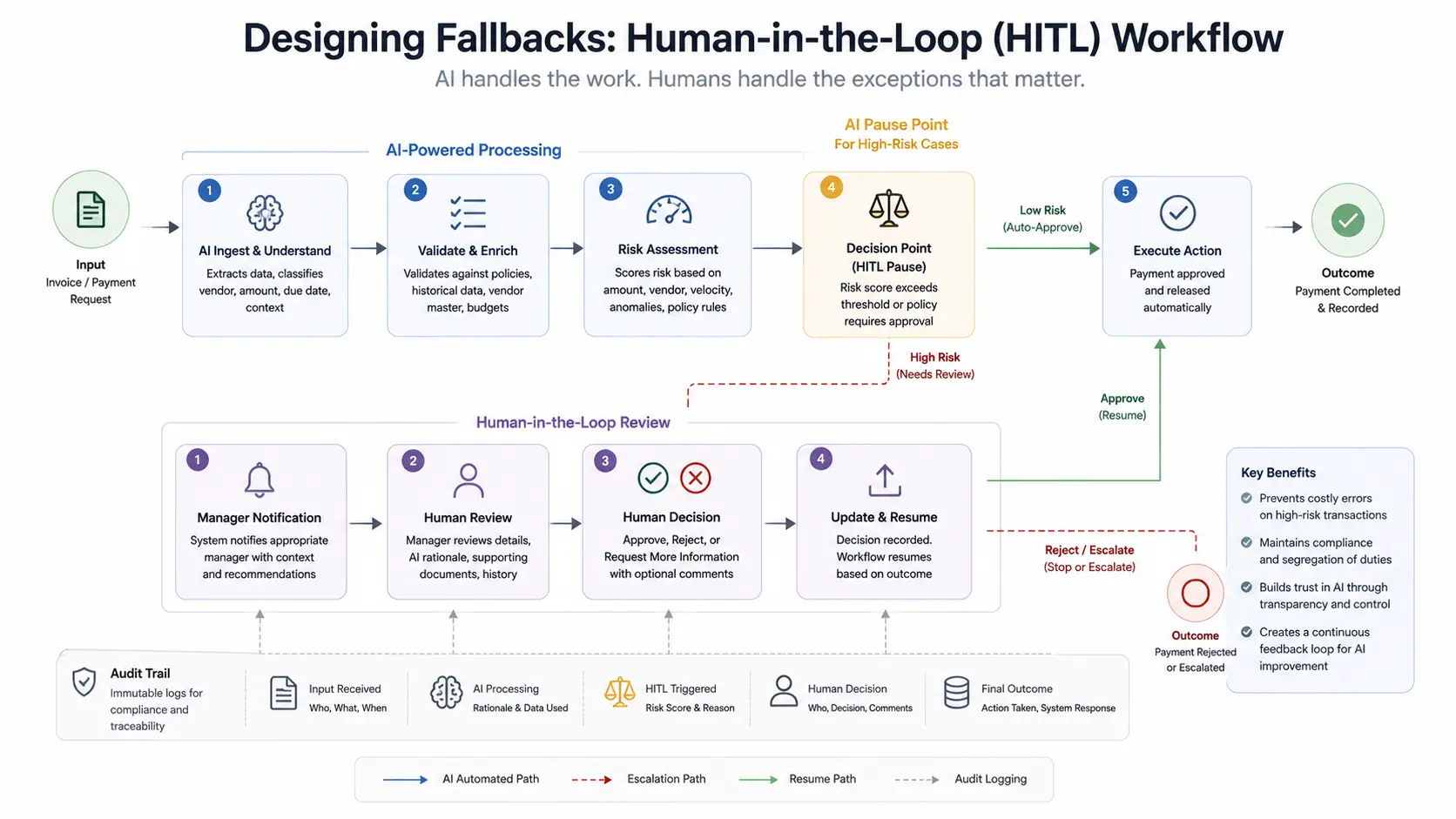
The most common architecture failure I see when enterprises automate repetitive tasks with AI is the absence of well-designed HITL fallback paths. Teams build agentic workflows that handle the 80% of cases correctly, then watch a critical edge case — a large payment routed incorrectly, a high-value customer misclassified as low-priority — cause a disproportionate operational or reputational consequence. Human-in-the-loop is not a failure mode. It is a designed feature of a production-grade system.

Human-in-the-Loop HITL workflow diagram showing AI pause points for high-risk financial approvals with manager notification and audit trail

HITL design requires three explicit decisions at the architectural stage: what triggers a human review (confidence threshold, financial materiality limit, policy rule, or anomaly detection signal), how the human receives and responds to the review request (Slack notification with approve/reject actions, email with decision link, or internal dashboard queue), and what happens in either branch (workflow resumes, escalates further, or is closed with an audit record). Systems that lack this structure either over-automate — running risky decisions without oversight — or under-automate — routing too many cases to humans and negating efficiency gains.

When HITL Is Architecturally Required

Financial transactions above materiality thresholds — payments, refunds, credits, contract modifications
LLM confidence scores below calibrated threshold for high-stakes classification decisions
First occurrence of a new input pattern not represented in the system’s training distribution
Any workflow output that triggers a downstream irreversible action (contract execution, vendor notification)

HITL Design Anti-Patterns

HITL queues with no SLA — human review becomes a bottleneck that eliminates automation’s latency benefit
Routing all low-confidence cases to a single reviewer — creates concentration risk and burnout
No feedback loop from human decisions back to the system’s routing logic — valuable corrections are lost
Binary approve/reject with no correction input — missing the opportunity to improve extraction accuracy over time

✅ The HITL Feedback Loop as a Training Signal

Every human decision in a HITL queue is a labeled training example. Logging the original input, the LLM’s classification, the human’s correction, and the correct action creates a dataset that can be used to fine-tune extraction prompts, adjust confidence thresholds, and identify systematic gaps in the system’s reasoning. Teams that treat HITL logs as operational waste miss the most valuable data asset their automation generates.

Conclusion: Automation as a Strategic Moat, Not Just a Cost Saver

The compounding advantage of systematic agentic workflow deployment

The cost reduction framing when you automate repetitive tasks with AI — “we’ll reduce headcount by X%” — is both the most commonly cited and the least strategically interesting outcome. The more durable competitive advantage comes from what happens to the organization’s operational capacity when intelligent automation is layered systematically across high-frequency workflows: response time compresses, data quality improves across systems, and operational decisions are made on richer, more current information.

A sales team operating with 90% CRM completeness and automated enrichment from every customer interaction makes qualification decisions faster and more accurately than a competitor working from static, partially-completed records. A finance team with intelligent invoice reconciliation catching discrepancies at extraction time — before they’re recorded — operates with fewer corrections, faster closes, and better vendor relationships than one relying on manual review at month-end. These are capability advantages, not just efficiency metrics.

The sequencing principle I return to consistently to automate repetitive tasks with AI: start with the Automation Matrix to identify your Quadrant 1 and 2 tasks, build the orchestration foundation before scaling LLM complexity, deploy HITL as a designed feature rather than a fallback afterthought, and treat every human decision in your review queues as a signal for system improvement. Agentic workflow deployment done this way is not a one-time project — it’s a compounding operational capability that widens its advantage with every iteration.

💡 The Architecture Principle That Matters Most

The difference between a proof-of-concept and a production agentic system is not the sophistication of the LLM — it is the robustness of the orchestration layer, the quality of the extraction schemas, and the discipline of the HITL design. Invest in those three elements before expanding to more complex reasoning tasks, and the system will scale gracefully rather than requiring a rebuild at each new requirement.

📖 Seven Years of Transition Work — A Pattern That Holds

Across every operations team I’ve helped transition from legacy automation to agentic workflows, the organizations that achieve durable results share one characteristic: they treat automation architecture as a permanent engineering function, not a project with a go-live date. The stack evolves, the models improve, the extraction prompts get refined. The teams that build that continuous improvement discipline into the operating model are the ones still compounding the advantage three years later.

⚡ Automation Architecture Comparison

Legacy rule-based BPA vs. Agentic AI workflows — May 2026.

DimensionLegacy If-Then BPAAgentic AI WorkflowWhen It Matters
Input HandlingStructured data onlyUnstructured + structuredEmails, PDFs, audio, free-text forms
Ambiguity ToleranceFails or misroutesReasons through ambiguityMulti-intent messages, variable formats
Maintenance LoadHigh — rules break silentlyLower — improves with HITL feedbackScaling volume and input variety
Integration DepthPoint-to-point connectorsOrchestrated multi-system API callsCRM + ERP + comms platform workflows
Audit CapabilityAction log onlyFull reasoning + decision traceCompliance, finance, regulated industries
Scale EconomicsLinear cost with volumeNear-flat marginal cost at scaleHigh-volume operations, batch processing

🏆 Architect’s Checklist: Before You Deploy an Agentic Workflow

💡 Define Your Extraction Schema Before Writing Workflow Logic

The JSON schema your LLM node returns is the contract between your intelligence layer and your routing layer. Define it explicitly, version it, and validate every output against it. A schema change without a corresponding workflow update is one of the most common causes of silent production failures in agentic systems.

✅ Run a Confidence Calibration Exercise Before Go-Live

Before deploying a new LLM extraction node in production, run 100–200 representative samples through it manually and score the outputs. This tells you where your confidence threshold should sit, which field types need prompt refinement, and what proportion of cases will realistically route to HITL. Skipping this step leads to poorly calibrated thresholds and either an overwhelmed review queue or under-supervised high-risk decisions.

⚠️ Model Version Changes Break Production Workflows

LLM providers deprecate and update models on their own schedules. Pin your n8n HTTP Request nodes to specific model version strings, not “latest” endpoints, and implement automated regression testing on your extraction schemas when updating to a new model version. An unannounced model update that subtly changes JSON output formatting can break downstream routing silently and at scale.

More Enterprise AI & Automation Guides

Scroll to Top