3
Step-by-Step: How to Build Custom AI Agent for Business
The full technical workflow — from raw documents to a grounded LLM response
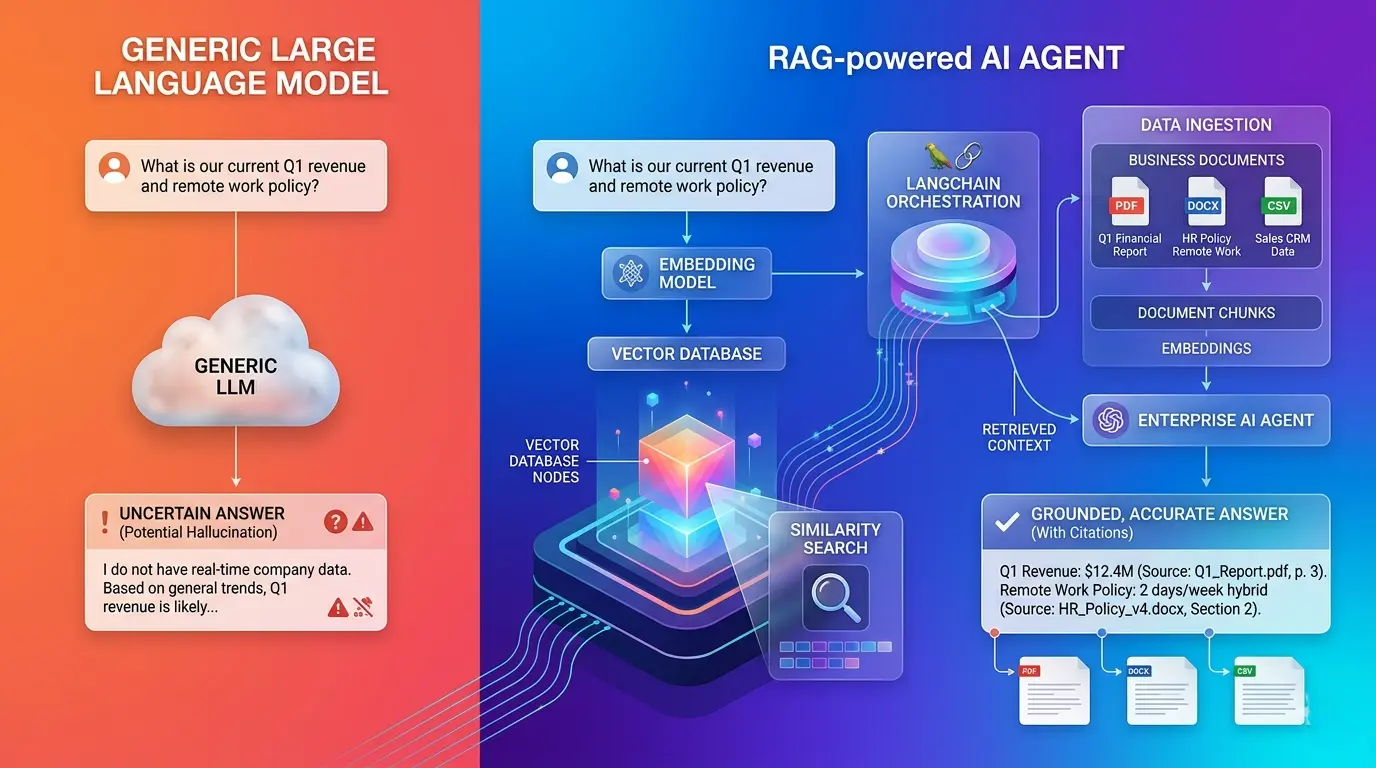
The RAG pipeline has two distinct phases that run at different times. The ingestion phase runs offline (or on a schedule) and transforms your raw documents into searchable vector embeddings. The retrieval phase runs at inference time — when a user asks a question — and retrieves relevant context before calling the LLM. Understanding this separation is fundamental to debugging and optimizing the system.
workflow diagram illustrating the complete RAG lifecycle, separating the asynchronous Ingestion Phase (offline document loading, chunking, and embedding) from the synchronous Retrieval Phase (query time similarity search and LLM context injection).
The Complete RAG Pipeline
📄 Raw Docs
→
✂️ Chunk
→
🔢 Embed
→
🗄️ Vector DB
→
🔍 Retrieve
→
🤖 LLM
1 Data Ingestion & Chunking
The ingestion phase begins with loading your source documents — internal PDFs, Confluence pages, Notion exports, Slack archives, Google Docs, or any structured text corpus your team works with. LangChain provides loaders for virtually every common format: PyPDFLoader, ConfluenceLoader, NotionDirectoryLoader. Once loaded, documents are split into smaller passages — chunks — before embedding.
visualization of chunking strategies, contrasting how small chunk sizes for dense technical documentation compare against larger chunk sizes with overlapping windows for narrative documents to preserve context.
Chunk Size — The Critical Variable
Most tutorials default to 512 or 1024 token chunks without explanation. In practice, optimal chunk size depends heavily on document type. Technical documentation with dense, self-contained paragraphs benefits from smaller chunks (256–400 tokens) that map cleanly to individual concepts. Narrative documents like case studies or policy manuals often require larger chunks (600–900 tokens) to preserve context. Plan for experimentation — your first chunk size is a hypothesis, not a decision, which is crucial when you build custom AI agent retrieval layers.
Overlap Strategy
Every text splitter should include a chunk overlap — a segment of tokens that repeats between adjacent chunks. A 10–15% overlap (e.g. 50 tokens of overlap on a 400-token chunk) prevents critical information from being severed at a chunk boundary. Without overlap, a sentence split across two chunks may be retrieved as incomplete context in either direction.
⚠️ Common Ingestion Mistake
Treating all document types identically. A 50-page legal contract and a 3-page product FAQ deserve different chunking strategies. Building a preprocessing layer that routes document types to appropriate splitters pays dividends immediately in retrieval precision.
2 Generating & Storing Embeddings
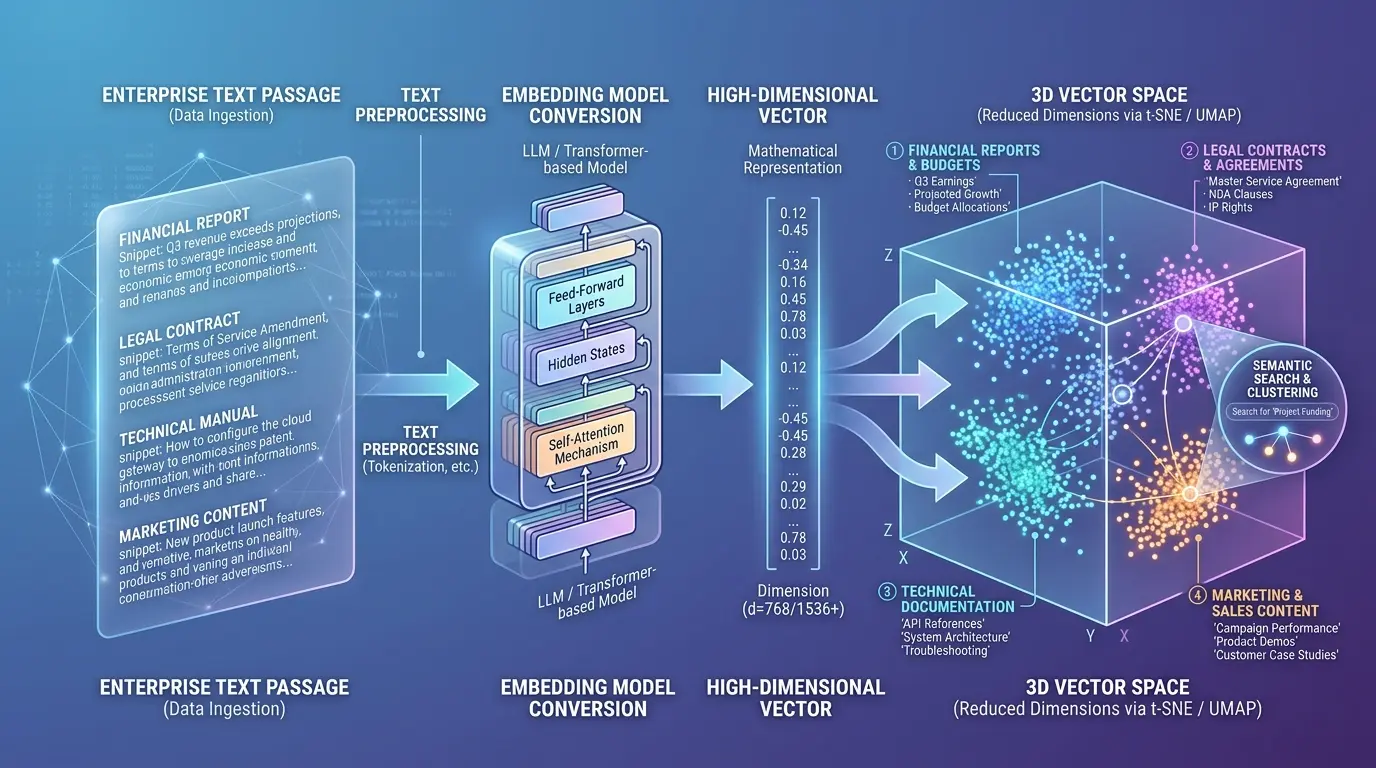
Once chunked, each passage is passed through an embedding model — a neural network that converts text into a dense numerical vector (typically 768 to 3072 floating-point numbers). These vectors encode semantic meaning: passages about similar topics cluster together in vector space, enabling similarity-based retrieval. These vectors are stored in the vector database alongside the original text and metadata.
Embedding Model Selection
OpenAI’s text-embedding-3-small is the current recommended default for most enterprise RAG systems. It delivers strong multilingual performance at 1536 dimensions, with a token cost roughly 5x lower than text-embedding-3-large. For maximum control over data privacy, open-source alternatives like nomic-embed-text or the E5 family from Microsoft can be self-hosted with minimal performance degradation on most enterprise document types.
Pro Tip — Token Cost Control
Embedding costs are incurred once per document chunk at ingestion time, not at query time. The expensive operation is the LLM call. Budget your token spend accordingly: optimize embedding by batching chunks in groups of 100+ per API call, and optimize inference costs by being precise about how many chunks you retrieve — 3 to 5 well-targeted passages almost always outperform 10 noisier ones.
3 The Retrieval Process
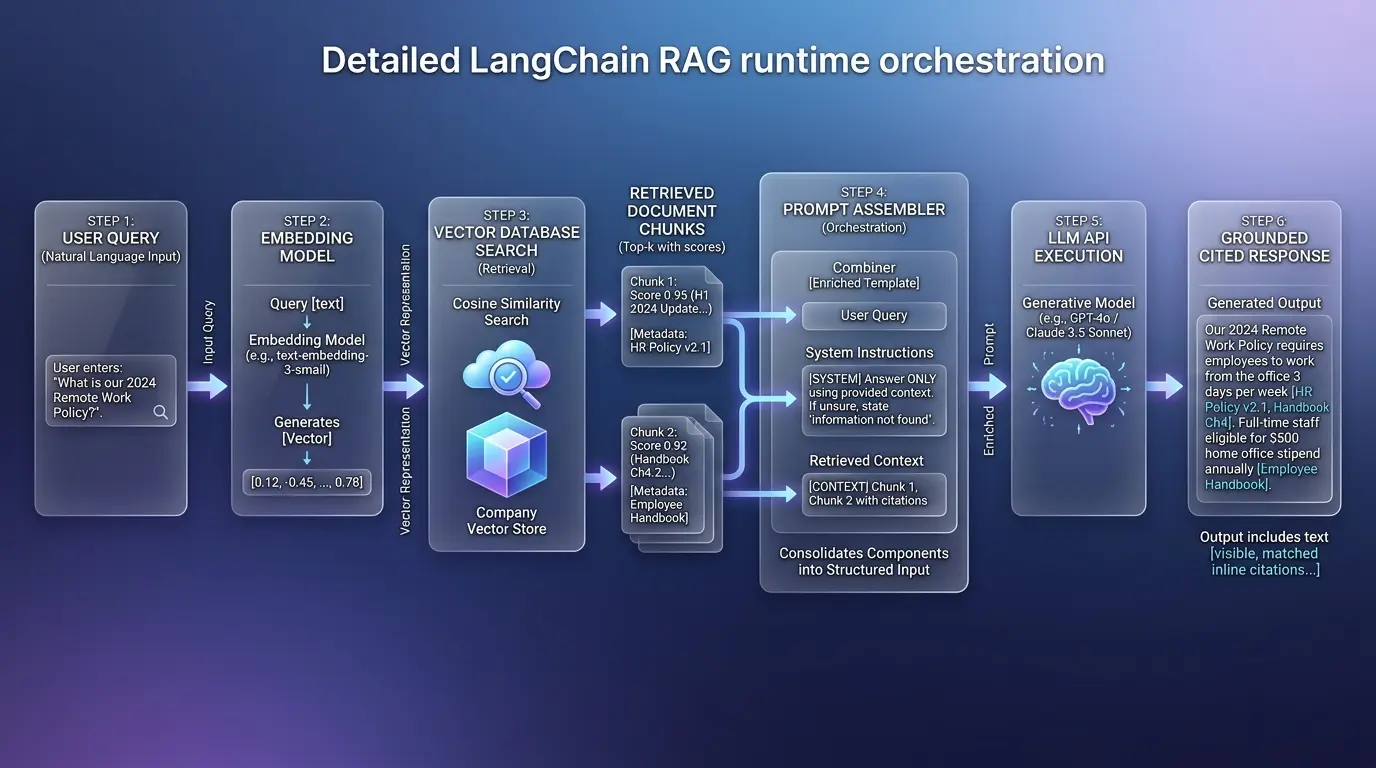
When a user submits a query, it is first converted to a vector using the same embedding model used during ingestion. The vector database then performs an approximate nearest-neighbor (ANN) search, returning the top-k chunks whose vectors are most similar to the query vector. This similarity is typically measured using cosine similarity — a geometric measure of the angle between two vectors that captures semantic relatedness regardless of exact word overlap.
conceptual visualization comparing standard keyword search (BM25) vs dense vector retrieval, using cosine similarity to map how natural language queries find semantically related context even when exact keywords are missing.
Similarity Search vs. Keyword Search
Vector similarity retrieval finds semantically related content even when the exact words don’t match. A query about “termination of employment” can retrieve a chunk about “ending a work contract” because they occupy similar regions of vector space. This is the core advantage over traditional keyword-based search (BM25) for natural language queries.
Hybrid Search — The Production Standard
In production, the highest retrieval precision typically comes from combining dense vector search with sparse keyword search (BM25 or similar) — a pattern called hybrid search. Both Pinecone and Qdrant support hybrid search natively. For domains with a lot of specific nomenclature (part numbers, legal article references, product codes), pure vector search sometimes misses exact-match requirements that keyword search handles trivially.
4 Crafting the System Prompt with Context
The system prompt is the architectural document that defines your agent’s identity, behavior, and constraints. In a RAG system, it also instructs the model on how to use the injected context. Retrieved passages are typically inserted between the system prompt and the user message using a structured template that clearly delineates source material from user input.
System Prompt Structure for RAG
A well-structured RAG system prompt has four parts: (1) Agent identity and scope — who the agent is and what domain it covers. (2) Context instruction — explicit instruction to answer using only the provided context passages. (3) Uncertainty handling — what the agent should say when the retrieved context doesn’t contain a sufficient answer (“I don’t have enough information in the available documentation to answer this accurately”). (4) Format and tone guidance — length, structure, and voice appropriate for your user base.
The Citation Requirement
Instruct your agent to cite the source document and section for every factual claim. This is both an accuracy mechanism and a trust-building feature. Users are more likely to verify and rely on outputs when they know exactly where the information came from. It also gives your team a direct debugging path when the agent makes errors — you can trace the answer back to a specific retrieved passage.
✅ Pro Tip — Context Window Management
Order your retrieved passages by relevance score before inserting them into the prompt — most relevant first. LLMs attend more strongly to content at the beginning and end of long contexts than to content in the middle. This ordering maximizes their influence on the final response and determines success when you build custom AI agent outputs for enterprise users.